EZY Portal Connector
The EZY Portal connector reads from and writes to the EZY Portal REST API. It supports both directions: use it as a target to push items, business partners, price lists, and other master data into a Portal tenant from an ERP or e-commerce platform, and as a source to extract sales quotations and orders from Portal for processing in another system.
When to use this connector
Section titled “When to use this connector”- Sync the item catalog from SAP Business One into EZY Portal on a schedule.
- Push business partners and their payment terms, groups, and price lists from an ERP to Portal.
- Populate Portal reference data (warehouses, tax categories, unit-of-measure groups, fiscal periods) when onboarding a new tenant.
- Extract sales quotations or orders created in Portal and send them to a downstream system such as an ERP or a flat file archive.
- Route e-commerce products from Shopify or WooCommerce into Portal as items.
Supported entity types
Section titled “Supported entity types”| Entity type | Direction | Description |
|---|---|---|
| Item | Target | Product or SKU master record, including pricing and unit-of-measure data. |
Business Partner (bp) | Target | Business partner record (customer, supplier, or both). |
| Customer | Target | Customer record from an e-commerce source (Shopify, WooCommerce, Wix). Maps to a Portal business partner. |
| Business Partner Group | Source + Target | Category used to group business partners. |
| Payment Terms | Source + Target | Payment terms reference data (for example, Net 30). |
| Item Group | Source + Target | Category used to group items. |
| Price List | Source + Target | Named list of prices, typically associated with a customer group. |
| Unit of Measure Group | Target | Group of related units of measure (for example, Weight: kg, g, lb). |
| Tax Group | Target | Tax category applied to items or business partners. |
| Warehouse | Target | Physical or logical inventory location. |
| Fiscal Period | Target | Accounting period definition. |
| Sales Quotation | Source + Target | Sales quotation document. |
| Sales Order | Source + Target | Confirmed sales order document. |
Source extraction reads from the Portal API using cursor-based incremental sync keyed on the record’s
updatedAtfield. Entity types marked Target-only do not have a Portal extraction endpoint and can only receive data.
Prerequisites
Section titled “Prerequisites”Before configuring this connector you need:
- A running EZY Portal tenant accessible over HTTPS (or HTTP for local testing with TLS validation disabled).
- An integration API key created in the Portal settings. This key is separate from regular user credentials and grants the integration service permission to read and write data via the API.
Connection profile fields
Section titled “Connection profile fields”Navigate to Connection Profiles in EZY Integrations and select EZY Portal as the system type. Fill in the following fields.
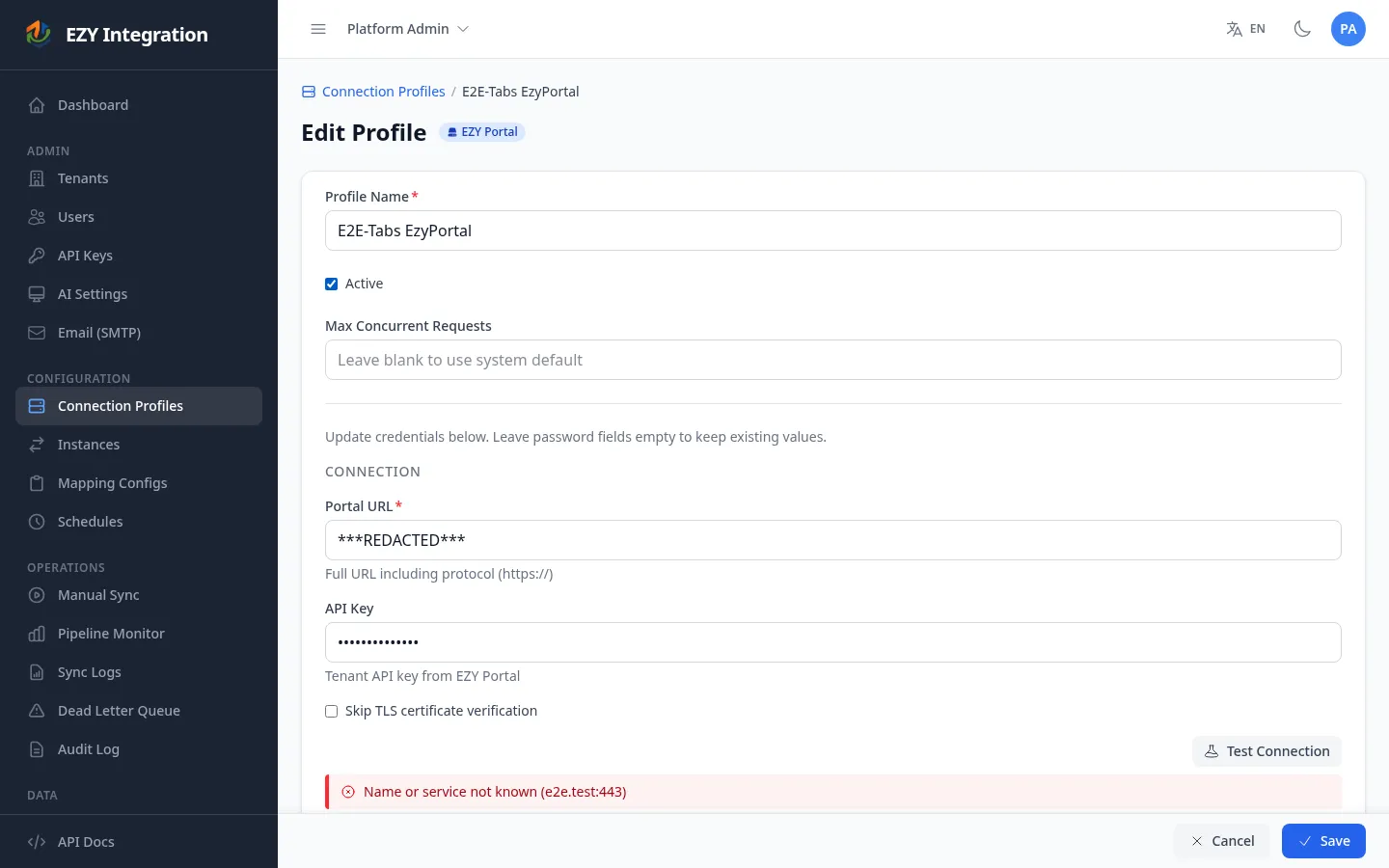
| Field | Required | Description | Example value |
|---|---|---|---|
| Portal URL | Yes | Base URL of your EZY Portal instance. Must include the scheme (https://). | https://portal.example.com |
| API Key | Yes | Integration API key from Portal settings. Stored encrypted after saving. | <YOUR_API_KEY> |
| Skip TLS Validation | No | Disable TLS certificate verification. Useful for local or self-signed environments. Not recommended for production. | Unchecked |
After filling in the fields, click Test Connection to verify that EZY Integrations can reach your Portal tenant with the credentials provided. A green result confirms a successful authentication round-trip.
Common pairings
Section titled “Common pairings”The most frequent pattern positions EZY Portal as the target of an inbound integration from an ERP. A job configured with SAP Business One as the source and EZY Portal as the target will push items, business partners, item groups, BP groups, price lists, payment terms, warehouses, tax groups, unit-of-measure groups, and fiscal periods — the full master data set a Portal tenant needs to operate. A second job in the reverse direction (Portal as source, SAP B1 Service Layer as target) handles sales quotation write-back.
E-commerce integrations follow the same pattern: Shopify or WooCommerce as the source, EZY Portal as the target, with items (products) and optionally customers flowing into Portal.
A Wix multi-entity integration can fan out to two targets simultaneously — EZY Portal receives products, services, plans, and menu items, while a Flat File target archives contacts and orders.
Known limitations
Section titled “Known limitations”- Warehouse writes are single-entity only. Unlike items, business partners, price lists, item groups, BP groups, and payment terms — which all support bulk create and update in a single API call — warehouse records are written one at a time.
- Field length enforcement. The connector automatically truncates values that exceed Portal’s field length limits before writing. If a truncation occurs, the run detail log records the original and truncated values.
- Duplicate prevention on first run. When a job is reset and re-run against a Portal tenant that already has records, the connector looks up each record by its code before creating. If a match is found, the operation is converted to an update. This prevents duplicate records after a database reset or when the same job is run against a pre-populated tenant.
- Price list base references must exist before dependents. If a price list references a base price list that has not yet been synced, the record is retried automatically. Ensure you sync base price lists in a separate mapping config that runs before dependent lists, or include them in the same run so ordering is handled naturally.
- Sales quotation conflict resolution. Sales quotations do not use a stable lookup code for reconciliation. A conflict (duplicate document number) is marked
CONFLICT_UNRESOLVEDin the run details and requires manual review. - Sales quotation status transition. A post-action can optionally advance a newly created draft quotation to
SENTstatus immediately after creation. This behavior is controlled by a post-action in the mapping configuration and is not triggered by default.
Related
Section titled “Related”- Credentials and Secrets — How connection profile credentials are stored and encrypted.
- Mapping Configuration — How to configure the extraction, normalization, and transformation rules for each entity type.
- Jobs Overview — How to link a source profile to a target profile and trigger runs.
- Run History — How to inspect the results of a completed run.
- All Connectors — Compare EZY Portal with other available connectors.