Handoff Inbox
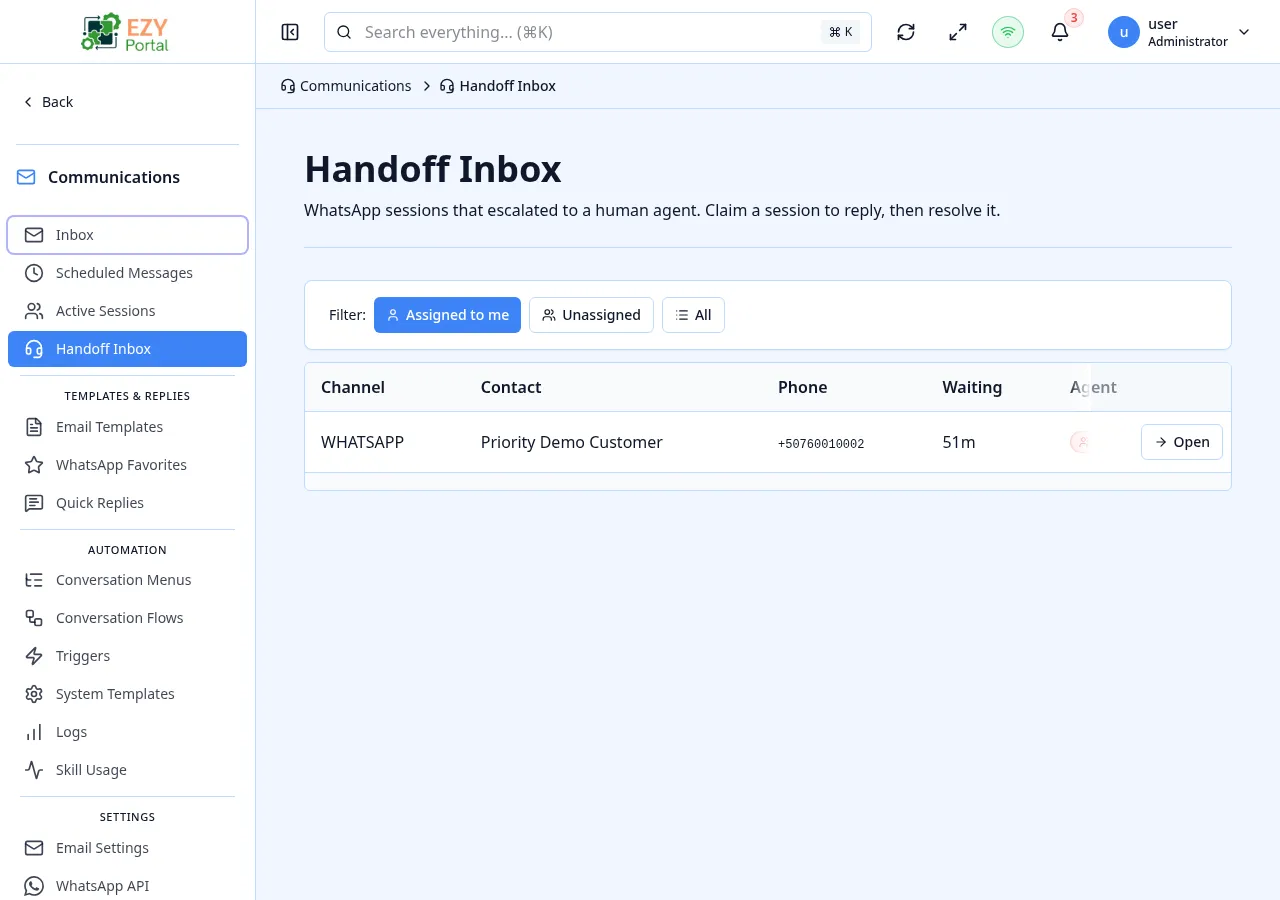
The Handoff Inbox is where human agents pick up conversations that were escalated from the chatbot — either because the contact selected a Handoff node in a Conversation Menu, because a Conversation Flow’s escalation branch was hit, or because the dispatcher could not resolve the contact’s request. The inbox updates in real time over Server-Sent Events.
Accessing the Page
Section titled “Accessing the Page”- Route:
/communications/handoff-inbox - Menu Path: Communications → Handoff Inbox
- Primary audience: Support agents and managers responding to escalated conversations.
Permissions
Section titled “Permissions”| Permission | Description |
|---|---|
communications.handoff_inbox (Read) | View the inbox and open a session detail |
communications.handoff_inbox (Write) | Claim, reply to and resolve sessions |
List Columns
Section titled “List Columns”| Column | Default Visible | Description |
|---|---|---|
| Phone / Contact | Yes | Phone number of the contact and the matched Business Partner if any |
| Assigned Agent | Yes | The agent that has claimed the session, or “Unassigned” |
| Time Since Escalation | Yes | How long the session has been waiting in the inbox |
| Last Message Preview | Yes | The most recent message in the conversation |
Filter Chips
Section titled “Filter Chips”| Chip | Description |
|---|---|
| Me | Sessions where the assigned agent is you |
| Unassigned | Sessions that nobody has claimed yet |
| All | Every session currently in the inbox |
Session States
Section titled “Session States”Sessions surface in the inbox in the WITH_AGENT state. Other states (such as RESOLVED or EXPIRED) are filtered out of the inbox view and visible on the Active Sessions admin page.
Actions
Section titled “Actions”Row Actions
Section titled “Row Actions”| Action | Description | Availability |
|---|---|---|
| View | Open the session detail page with the full transcript and reply form | Always |
| Claim | Assign the session to yourself | Available on Unassigned rows |
Detail Actions
Section titled “Detail Actions”| Action | Description |
|---|---|
| Reply | Send a WhatsApp message to the contact from the active session |
| Resolve | Mark the session as resolved and close it. The contact can re-engage to start a new session. |
The detail page subscribes to a Server-Sent Events stream so new contact messages appear in the transcript in real time without a manual refresh.
Real-time updates
Section titled “Real-time updates”graph LR
CONTACT[Contact sends WhatsApp message] --> COMM[Communications dispatcher]
COMM --> SSE[SSE stream]
SSE --> AGENT[Agent's open inbox / detail page]
AGENT -->|Reply| COMM
COMM -->|Outbound WhatsApp| CONTACT
The inbox listing and the open session detail both subscribe to the dispatcher’s event stream. New escalations appear at the top of the inbox without reload; the open detail page shows the contact’s new message immediately.
- A session can only be claimed by one agent at a time. A second agent who tries to claim an already-claimed session sees an inline error and the row is refreshed to show the current assignment.
- Resolving a session is final — re-engaging the contact creates a new session.
- A session that times out without a reply transitions automatically to
EXPIREDand drops out of the inbox. - The reply form sends through the same WhatsApp account that received the original message; agents do not choose a sender.
Common tasks
Section titled “Common tasks”- Open Communications → Handoff Inbox.
- Filter by Unassigned to see sessions waiting for an agent.
- Click Claim on a row to assign it to yourself, then View to open the detail page.
- Read the transcript, type a reply and send. Use Resolve when the contact’s issue is handled.
Related Pages
Section titled “Related Pages”- Active Sessions — admin view of every non-terminal session, including ones that are not yet in the handoff inbox
- Conversation Logs — historical view of every conversation, including resolved sessions
- Conversation Menus — configure which Handoff nodes route contacts to this inbox