Fiscal Integration
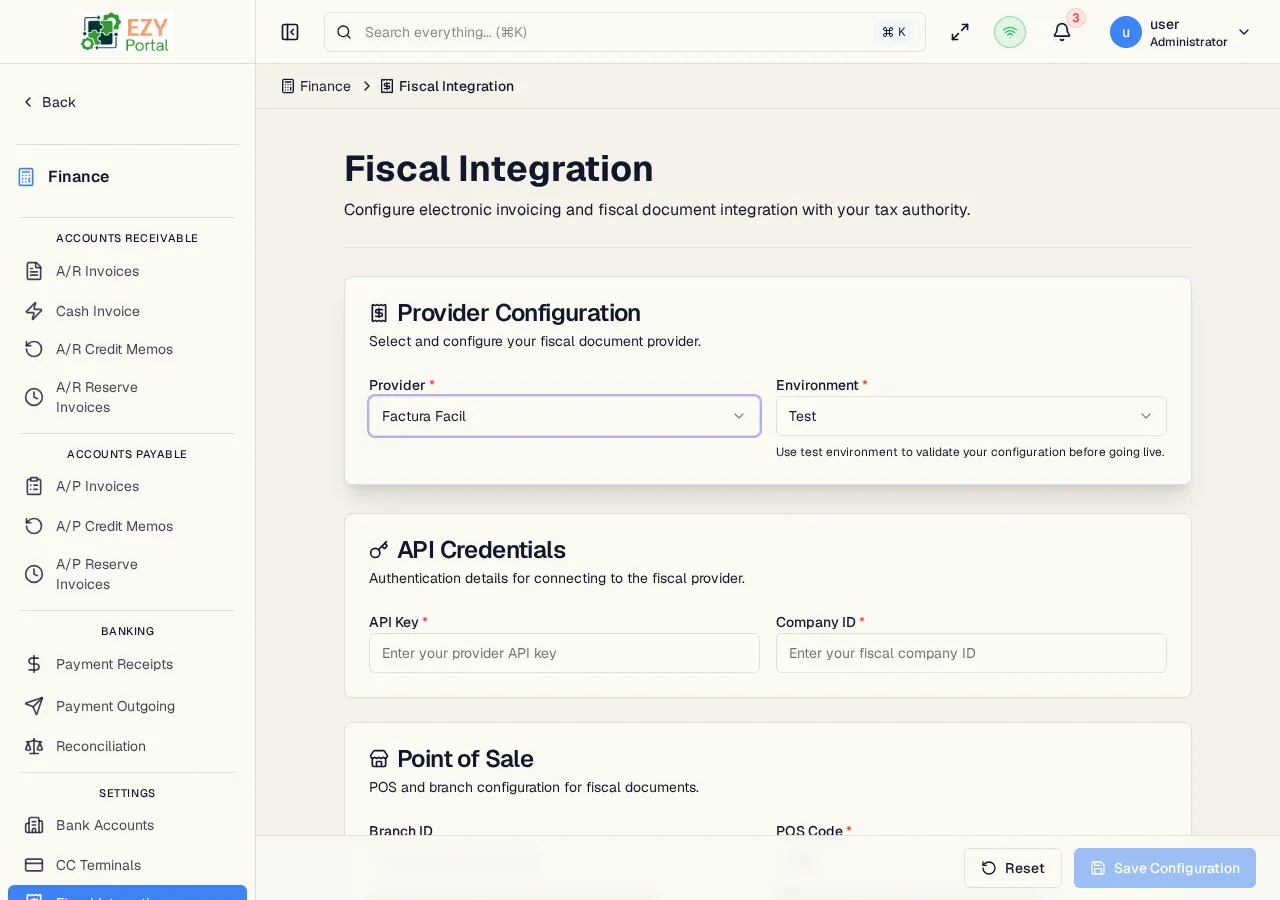
The Fiscal Integration settings page lets tenant administrators configure the connection to a third-party fiscal document provider. When enabled, the system automatically generates government-required electronic invoice documents (e.g., CUFE in Panama) when A/R invoices, A/R reserve invoices, A/R credit memos, and cash invoices are posted. Two providers are supported: FacturaFácil and The Factory HKA.
Accessing the Page
Section titled “Accessing the Page”Navigate to Finance → Settings → Fiscal Integration in the sidebar, or go to /finance/settings/fiscal-integration.
- Primary audience: Tenant administrators
- Availability: This page is only active for tenants in supported countries (currently Panama). For other countries, the page shows a “Not Available” notice.
What you can do here
Section titled “What you can do here”- Select the fiscal document provider — FacturaFácil or The Factory HKA
- Choose between test and production environments
- Configure provider-specific credentials and identifiers
- Set the POS branch, point-of-sale code, and (for HKA) the serial device
- Enable or disable the fiscal integration
- Test the connection to verify credentials are valid
- Download the authorized fiscal PDF and view the QR image on issued documents
Configuration Sections
Section titled “Configuration Sections”Provider
Section titled “Provider”| Field | Required | Type | Description | Default | Validation |
|---|---|---|---|---|---|
| Provider | Yes | Select | Fiscal document provider | FacturaFácil | Supported: FacturaFácil, The Factory HKA |
| Environment | Yes | Select | Test or Production | Test | Use Test for development; switch to Production for live transactions |
Use the Test environment for initial setup and validation. Switch to Production only when you are ready to issue live fiscal documents.
The credential and POS-configuration fields shown below the Provider selector adapt to the chosen provider — each provider declares the keys it requires, and the form renders them dynamically.
Credentials and POS Configuration
Section titled “Credentials and POS Configuration”The fields shown depend on the selected provider. All provider-specific settings are stored encrypted in the tenant’s fiscal configuration.
FacturaFácil
| Field | Required | Type | Description |
|---|---|---|---|
| API Key | Yes | Password | Authentication key provided by the fiscal provider; stored securely and not displayed after saving |
| Company ID | Yes | Text | Company identifier registered with the fiscal provider |
| Branch ID | No | Text | Branch identifier if the company has multiple branches |
| POS Code | Yes | Text | Point-of-sale code registered with the fiscal provider |
The Factory HKA
| Field | Required | Type | Description | Default |
|---|---|---|---|---|
| Branch Code | Yes | Text | Branch coordinate used by HKA when storing and retrieving documents | 0000 |
| POS | Yes | Text | Point-of-sale coordinate used by HKA | 001 |
| Serial Device | No | Text | HKA-issued serial device identifier; used as part of the fiscal-PDF download coordinates |
Additional credential keys may appear depending on provider configuration. The form always shows the exact set of fields the active provider declared at registration time.
Status
Section titled “Status”| Field | Description |
|---|---|
| Enabled | Toggle to activate or deactivate fiscal document generation. When disabled, invoices are posted without generating fiscal documents. |
The status card also shows the current enabled/disabled badge (green = Enabled, grey = Disabled).
Testing the Connection
Section titled “Testing the Connection”Click Test Connection to verify that the credentials and environment settings are correct. The result shows:
- A green checkmark and “Connection successful” if the provider responds correctly
- A red X and “Connection failed” if credentials are invalid or the provider is unreachable
Always test the connection after changing credentials or switching environments.
Common tasks
Section titled “Common tasks”- Open Fiscal Integration from the Finance → Settings menu.
- Select the provider and environment.
- Enter the API Key, Company ID, and POS Code.
- Click Test Connection to verify.
- Toggle Enabled to activate.
- Click Save to apply the configuration.
Fiscal PDF Download and QR Image
Section titled “Fiscal PDF Download and QR Image”When a document is fiscalized, the provider returns a fiscal-document identifier (CUFE in Panama) and — depending on the provider — a QR image encoded as base64. Both are stored on the document’s Fiscal Data.
- Where to download — The detail pages for A/R Invoice, A/R Reserve Invoice, and A/R Credit Memo show a Download Fiscal PDF action when the document is fiscalized. The endpoint is
GET /<document-type>/{id}/fiscal/pdfand returns a PDF named{documentNumber}-fiscal.pdf. - Provider behavior — With The Factory HKA, the system uses the stored fiscal coordinates (branch code, POS, serial device, document number, document type, emission type) to retrieve the authorized PDF directly from HKA. With FacturaFácil, the stored PDF URL is followed instead.
- QR image — When the provider returns a QR image, it is stored as a data URI in the document’s fiscal data and rendered on the invoice detail page. If the provider does not return an image but returns a QR value, the system generates the QR image from the value and stores the PNG. Both
qrCode(the value) andqrImageBase64(the rendered image) are available on the document.
- Fiscal integration is only available for tenants registered in supported countries (currently Panama).
- When fiscal integration is enabled, the Cash Invoice form shows an additional Fiscal Data section for capturing the customer type and name for the electronic document.
- The CUFE (fiscal document identifier) assigned by the provider is stored on the invoice and visible in the invoice detail page along with the QR image.
- Once an A/R Invoice, A/R Reserve Invoice, or A/R Credit Memo has been fiscalized, cancellation of the document is blocked — issue a credit memo against it instead.
- Changing from Test to Production environment requires re-entering production credentials. Test credentials are not valid in Production.
- Provider settings are stored encrypted. Re-saving the form with a blank password field preserves the existing stored value.
Related Pages
Section titled “Related Pages”- Cash Invoice — Uses fiscal data when integration is enabled
- A/R Invoice Detail — Shows the CUFE, QR image, and fiscal PDF download
- A/R Reserve Invoices — Reserve invoices participate in fiscal emission and PDF download
- A/R Credit Memos — Credit memos against fiscalized documents also issue a fiscal document