SAP Business One Connector
The SAP Business One connector reads master data and transactional documents directly from a SAP B1 database. It also writes sales quotations and orders back into SAP B1 through the SAP Service Layer REST API. Because extraction uses the database layer and write-back uses a separate REST endpoint, both sides require their own credentials and can be tested independently.
When to use this connector
Section titled “When to use this connector”- Sync item catalogs, business partners, price lists, and reference data from SAP B1 into EZY Portal.
- Push product data from SAP B1 to an e-commerce store such as Shopify.
- Extract sales quotations or orders from SAP B1 for downstream processing.
- Write Portal-generated sales quotations or orders back into SAP B1 as confirmed documents.
- Feed SAP B1 master data into any target supported by EZY Integrations (Flat File, Generic API, and so on).
Supported entity types
Section titled “Supported entity types”| Entity type | Direction | Notes |
|---|---|---|
| Item | Source | Item master data including pricing, stock levels, images, and attachments. |
| Business Partner | Source | Customers and suppliers. |
| Business Partner Group | Source | BP group reference data. |
| Payment Terms | Source | Payment terms reference data. |
| Item Group | Source | Item group reference data. |
| Price List | Source | Named price lists with optional base list and factor. |
| Warehouse | Source | Warehouse reference data. |
| Tax Group | Source | Tax category / tax group reference data. |
| Unit of Measure Group | Source | UoM group and its member units. |
| Fiscal Period | Source | Accounting period definitions. |
| Sales Quotation | Source + Target | Extract quotations from SAP B1; write Portal-sourced quotations back via Service Layer. |
| Sales Order | Source + Target | Extract orders from SAP B1; write Portal-sourced orders back via Service Layer. |
Master data entity types (Item through Fiscal Period) are extracted from the database. Write-back is only supported for Sales Quotation and Sales Order, and requires the Service Layer section to be configured.
Prerequisites
Section titled “Prerequisites”Before creating a connection profile for SAP Business One, confirm that:
- The EZY Integrations server can reach the SAP B1 SQL Server host on the database port (default 1433).
- A database user exists with read access to the SAP B1 company database. A minimum of
SELECTpermission on all SAP B1 tables your mapping configurations reference is required. - For write-back only: A SAP Service Layer instance is running and reachable from the EZY Integrations server. A Service Layer user with permission to create and update sales documents must be available.
- For image or attachment sync only: A network share containing SAP B1 item images or document attachments is reachable, and network credentials (domain user or local account) are available if the share requires authentication.
- An operator with DBA access has optionally enabled SQL Server Change Tracking on the SAP B1 database. See Change Tracking and the Extraction Model for details.
Connection profile fields
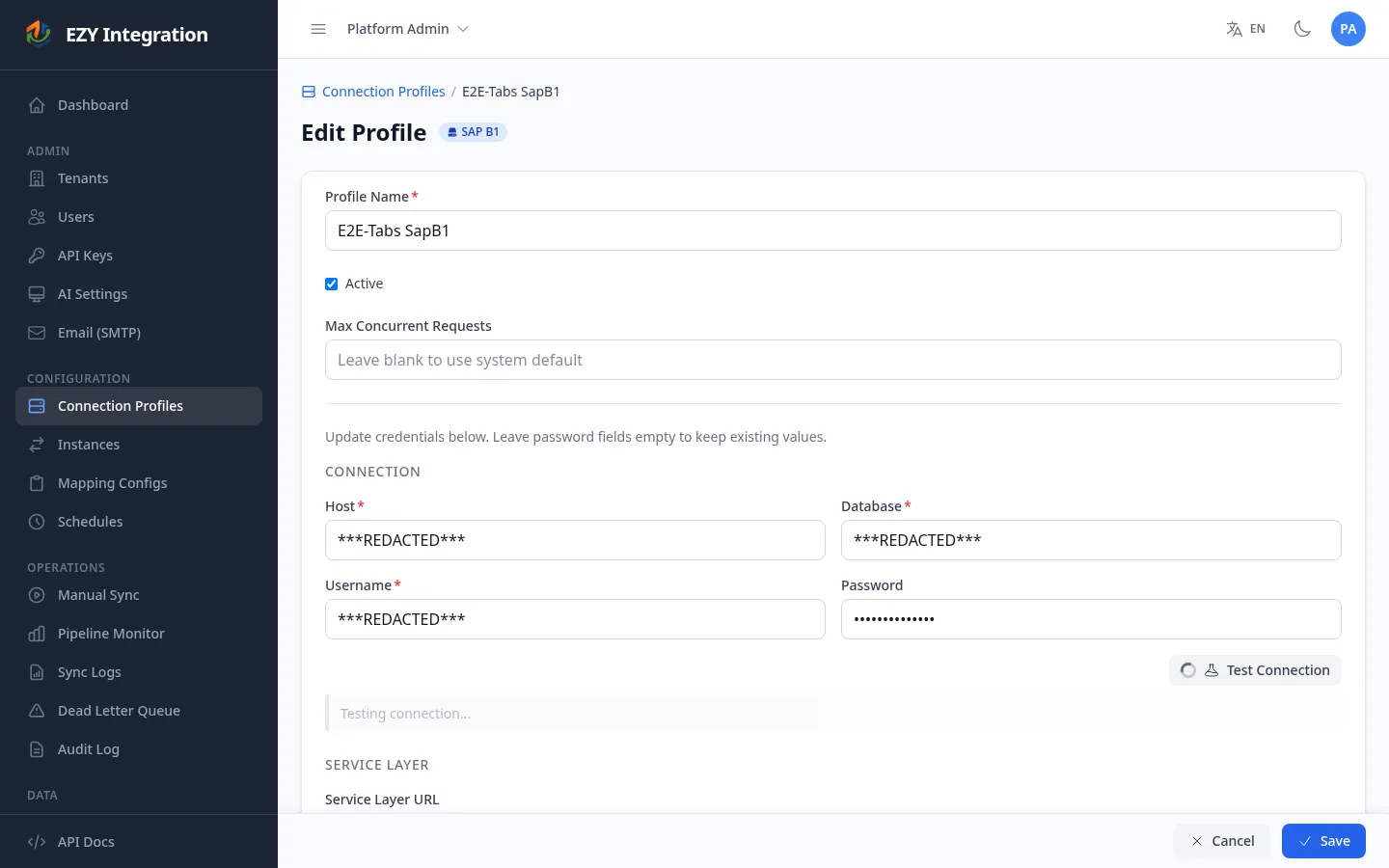
Section titled “Connection profile fields”The SAP Business One connection profile has three independent sections. Each section has its own Test Connection button.
Connection (required for all entity types)
Section titled “Connection (required for all entity types)”| Field | Type | Required | Description | Example |
|---|---|---|---|---|
| Host | Text | Yes | Hostname or IP address of the SQL Server. Include a custom port using host:port notation if not using the default. | 192.168.1.100 or dbserver:1433 |
| Database | Text | Yes | Name of the SAP B1 company database. | SBODemoUS |
| Username | Text | Yes | SQL Server login username. | sa |
| Password | Password | Yes | SQL Server login password. | — |
Service Layer (required for write-back)
Section titled “Service Layer (required for write-back)”| Field | Type | Required | Description | Example |
|---|---|---|---|---|
| Service Layer URL | URL | No | Base URL of the SAP Service Layer instance. Required only if write-back is used. | https://<server>:50000/b1s/v1 |
| Company DB | Text | No | Company database name as recognised by the Service Layer. Often the same as the SQL database name. | SBODemoUS |
| SL Username | Text | No | Service Layer login username. | manager |
| SL Password | Password | No | Service Layer login password. | — |
| Skip TLS certificate verification | Checkbox | No | Disable TLS validation for the Service Layer endpoint. Not recommended for production environments. | Unchecked |
File Paths (required for image or attachment sync)
Section titled “File Paths (required for image or attachment sync)”| Field | Type | Required | Description | Example |
|---|---|---|---|---|
| Network Username | Text | No | Username for authenticating to the network share. Leave empty if the share is publicly accessible or if the EZY Integrations server account already has access. | DOMAIN\svc-integration |
| Network Password | Password | No | Password for the network share user. | — |
| Image Path | Text | No | Path to the directory where SAP B1 item images are stored. | smb://fileserver/share/images |
| Attachment Path | Text | No | Path to the directory where SAP B1 document attachments are stored. | smb://fileserver/share/attachments |
Three independent Test Connection actions
Section titled “Three independent Test Connection actions”The SAP Business One form has four Test Connection buttons — one per section (Connection, Service Layer, Image Path, Attachment Path). Each test is independent and verifies only that section.
| Test | What it verifies |
|---|---|
| Test Connection (Connection section) | Establishes a SQL connection to the database host using the supplied Host, Database, Username, and Password. A passing result confirms the integration can query SAP B1 data. |
| Test Connection (Service Layer section) | Sends a login request to the Service Layer URL using the Company DB, SL Username, and SL Password. A passing result confirms write-back is available. |
| Test Connection (Image Path section) | Attempts to access the Image Path using the Network Username and Network Password. A passing result confirms item images can be read. |
| Test Connection (Attachment Path section) | Attempts to access the Attachment Path using the same network credentials. A passing result confirms document attachments can be read. |
Run each test independently after filling in that section. You do not need the Service Layer or File Paths sections to be configured if you only need to extract master data.
Change tracking and the extraction model
Section titled “Change tracking and the extraction model”EZY Integrations reads SAP B1 data using direct database queries shaped by the extraction block in your mapping configuration. You can configure what columns to retrieve, apply filters, and join related tables — all without writing raw SQL.
Incremental sync
Section titled “Incremental sync”By default, each extraction run reads only records that changed since the previous run. The system tracks a cursor — a value (commonly a last-modified date or a version number) stored at the end of each successful run. The next run starts by querying only records newer than that cursor.
For incremental sync to work on a given entity type, the source table must expose a reliable change indicator. SAP B1 supports two models:
- UpdateDate column: Many SAP B1 tables include an
UpdateDatecolumn. The extraction cursor advances to the most recent date seen in each run. Tables without anUpdateDatecolumn must use a full scan (the cursor is not advanced). - SQL Server Change Tracking: When a DBA enables SQL Server Change Tracking at the database and table level, the extractor can use version-based incremental sync. This is more reliable than
UpdateDatebecause it captures deletes as well as inserts and updates.
Your SAP B1 DBA must enable Change Tracking before version-based incremental sync can be used. The steps are:
- Enable Change Tracking at the database level, specifying a retention window (7 days is recommended to cover missed syncs over a full work week).
- Enable Change Tracking on each SAP B1 table you want to sync incrementally.
- After enabling Change Tracking, the first sync run captures an initial version snapshot. Subsequent runs use incremental extraction.
If the stored sync cursor falls outside the Change Tracking retention window (for example, after a long outage), the integration automatically falls back to a full extraction for that run and then resumes incremental sync from the new version.
Full scan fallback
Section titled “Full scan fallback”Any entity type whose source table does not have a compatible cursor column, or whose mapping config does not declare a cursor column, always performs a full scan. Full scans read the entire table on every run and are suitable for small, infrequently-changing reference tables.
Known limitations and quirks
Section titled “Known limitations and quirks”- No Service Layer extraction. All data is read via direct SQL access. The Service Layer is only used for write-back. This means the SQL credentials are required even when your intent is write-back only; they are used to verify connectivity and to look up source records.
- Network credentials are shared across both file paths. The same Network Username and Network Password apply to both the Image Path and the Attachment Path. If your image share and attachment share require different credentials, contact your administrator to consolidate access under one account.
orderentity type routes to SAP B1. When a mapping config targets SAP B1 with entity typeorder(from an e-commerce source), the write-back handler treats it the same assalesorder. This allows e-commerce orders to be created directly in SAP B1 without a remapping step.- Host port notation. If your SQL Server listens on a non-default port, enter the host as
hostname:port(for example,dbserver:49123). The connector automatically converts this to the SQL Server comma-separated format (dbserver,49123) internally. - TLS is always enabled for the SQL connection. The SQL Server connection uses encrypted transport with
TrustServerCertificate = true. There is no option to disable SQL Server TLS from the UI.
Related
Section titled “Related”- Credentials and Secrets — How connection profile credentials are stored and secured.
- Mapping Configuration — How to configure extraction, normalization, and transformation rules for SAP B1 entity types.
- Run History — How to trigger a manual sync and monitor run results.
- All Connectors — Compare SAP Business One with other available connectors.