Onboarding Dashboard
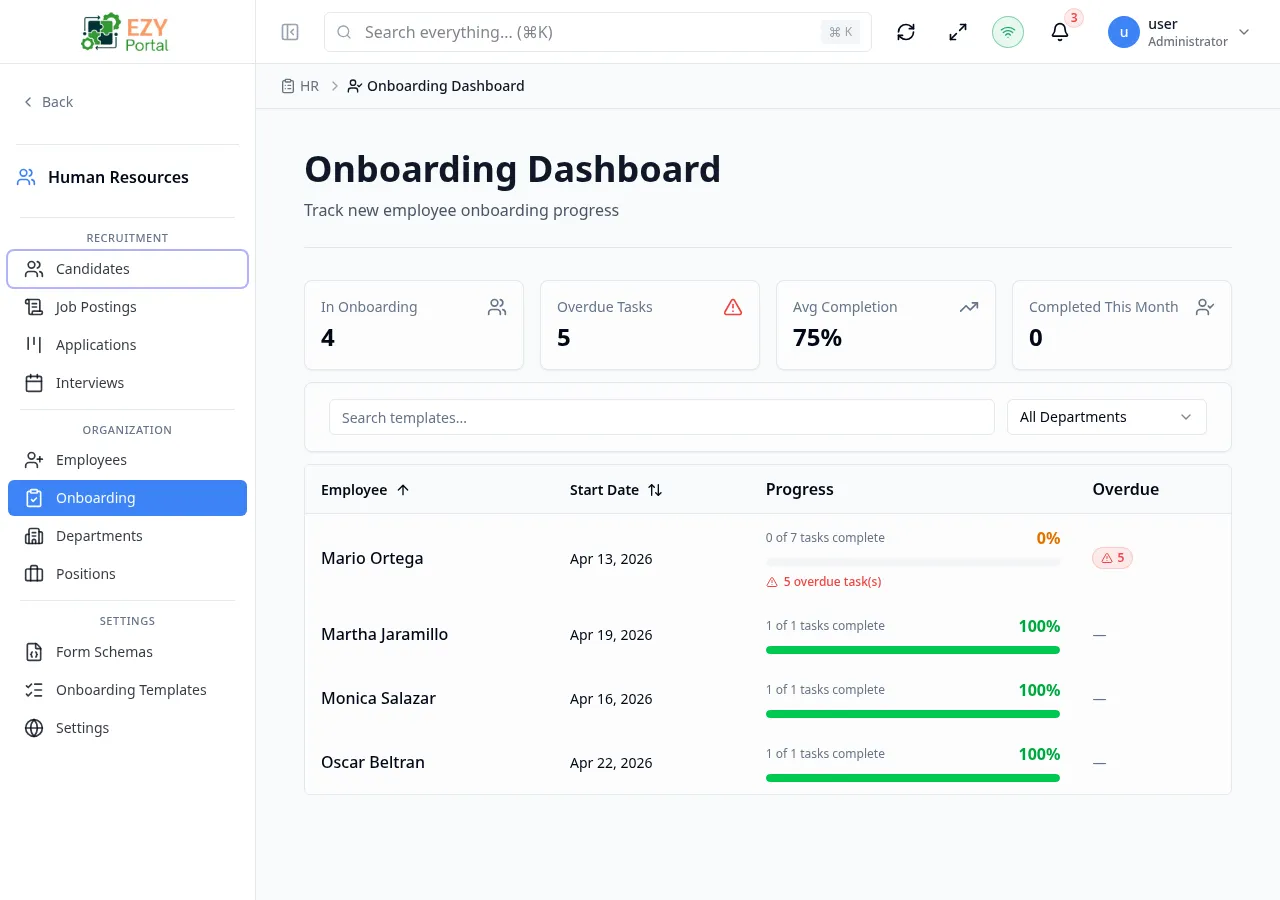
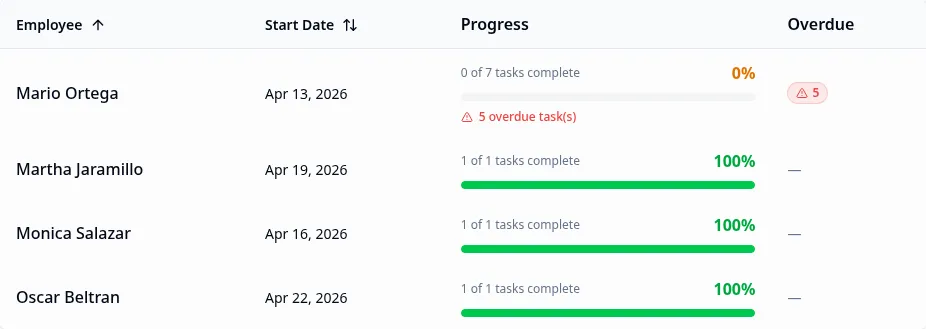
The Onboarding Dashboard provides a real-time overview of every employee currently in the onboarding process. Four KPI metric cards summarize the overall state, and the table below lists each employee with their onboarding start date, task progress bar, and overdue task count. Clicking an employee row navigates to the Onboarding Employee detail page.
Accessing the Page
Section titled “Accessing the Page”- Route:
/onboarding - Menu Path: HR → Onboarding → Dashboard
Metrics Cards
Section titled “Metrics Cards”| Metric | Description |
|---|---|
| In Onboarding | Total number of employees currently with Onboarding status |
| Overdue Tasks | Sum of all overdue tasks across all employees in onboarding |
| Avg Completion | Average completion percentage across all onboarding employees |
| Completed This Month | Number of employees whose onboarding was marked complete in the current calendar month |
The Overdue Tasks card turns red when the count is greater than zero.

Employee Table
Section titled “Employee Table”| Column | Description |
|---|---|
| Employee | Full name and position/department below |
| Start Date | The employee’s onboarding start date |
| Progress | Visual progress bar showing completed vs. total tasks; percentage shown |
| Overdue | Number of overdue tasks for this employee (shown as a badge when > 0) |
Clicking a row navigates to the Onboarding Employee page for that employee where tasks can be reviewed and completed.
Filtering
Section titled “Filtering”| Filter | Type | Description |
|---|---|---|
| Search | Free text | Filters employees by name |
| Department | Select | Filter by the employee’s assigned department |
Sorting
Section titled “Sorting”The table supports sorting by Employee name and Start Date. Default sort: start date ascending (earliest first).
Pagination
Section titled “Pagination”The dashboard uses client-side pagination within the loaded data set. Use page navigation controls at the bottom.
Business rule notes
Section titled “Business rule notes”- Only employees with
Onboardingstatus appear in this dashboard. Once an employee’s onboarding is marked complete, their status transitions toActiveand they are removed from this view. - The overdue count is calculated based on the task due days defined in the assigned onboarding template relative to the employee’s onboarding start date.
- The metrics at the top are calculated from the full unfiltered data set; the table below reflects the applied search and department filter.
Common tasks
Section titled “Common tasks”- Open HR → Onboarding → Dashboard from the sidebar.
- Review the Overdue Tasks metric to identify employees needing attention.
- Click an employee row to open the Onboarding Employee page and review or complete their tasks.
Related Pages
Section titled “Related Pages”- Onboarding Employee — Per-employee onboarding task checklist
- Onboarding Templates — Configure onboarding task templates
- Employees — Employee records and statuses