Common Errors
This page covers the most common failure modes users encounter in EZY Integrations, organized by category. For each symptom you will find the likely cause, what to look at in Sync Logs, and the recommended fix.
Connection profile errors
Section titled “Connection profile errors”These errors occur before or during the Ingest stage when the system cannot reach the source or target system.
| Symptom | Likely cause | Fix |
|---|---|---|
| Connection test returns “Authentication failed” | Credentials are wrong, expired, or revoked. | Open the connection profile, re-enter the credentials, and run the test again. |
| Connection test returns “Host not reachable” or times out | The host name is incorrect, the system is offline, or a firewall is blocking the port. | Verify the host name and port in the profile. Confirm the source or target system is running and reachable from the integration server. |
| TLS / SSL handshake error | The target system uses a self-signed certificate and TLS verification is enabled. | Enable Skip TLS validation in the connection profile only if you trust the target environment. Do not disable TLS validation in production without consulting your security team. |
| SAP Business One connection test fails | The database host, database name, username, or password is incorrect; or the SQL port is blocked. | Confirm the SQL Server or HANA host name, database name, and login credentials. Check that the integration server can reach the database port over the network. |
| Shopify connection test fails with “Invalid token” | The Shopify custom app access token has been revoked, or the wrong OAuth credentials were entered. | Regenerate the access token in your Shopify admin and update the connection profile. |
Where to look in Sync Logs: An Ingest-stage failure with an authentication or network error message appears in the run’s error detail. The message typically includes the HTTP status code or the connection exception text.
Mapping errors
Section titled “Mapping errors”These errors occur at the Normalize or Transform stage when the mapping configuration produces an unexpected result.
| Symptom | Likely cause | Fix |
|---|---|---|
| ”Required field missing” in Normalize stage | A field that the canonical format requires is null or absent in the source data. | Open the mapping configuration and check the normalization block. Add a static field or a fallback source path for the missing field. |
| ”Type mismatch” or conversion error | The source field contains a value the system cannot convert to the expected type (for example, a text string in a numeric field). | Review the source data for the affected records. Add a value transformer (such as ToDecimal or ToString) in the transformation block, or correct the data at the source. |
| ”Unknown source path” | A field path in the mapping configuration references a column or property that does not exist in the source payload. | Open the mapping configuration editor. Use the schema helper (available for SAP B1) or check the source system’s field names and correct the path. |
| ”Unknown entity type” | The entity type name in the mapping configuration does not match any type supported by the connector. | Check the exact entity type name in Entity Types and correct the mapping configuration. |
| Target field validation fails | A field value produced by transformation exceeds the target system’s field-length limit or format requirement. | Add a transformer (such as Truncate or a format transformer) to bring the value within the target’s accepted range. See Value Transformers. |
Where to look in Sync Logs: Normalize and Transform failures appear per entity in the run detail view. The error message names the field path or transformer that failed.
Stage-specific failures
Section titled “Stage-specific failures”| Stage | What it looks like in Sync Logs | What to try next |
|---|---|---|
| Ingest | Run shows zero records extracted; error references a connection or query issue. | Check the connection profile. If using SAP B1, verify the extraction SQL in the mapping config. Confirm the source system has records matching the cursor window. |
| Normalize | Run shows extracted records but a normalize-error count greater than zero. | Open the failing run’s detail view and expand the entity error. Review the normalization block in the mapping config. |
| Transform | Records normalized but a transform-error count greater than zero. | Open the entity error. Check the field mapping, transformer options, and static fields. Ensure every required target field has a value source. |
| Execute | Transformed records rejected by the target system. | Check the error message for the HTTP status code and rejection reason from the target. A 400 usually means a field value is invalid; a 401 means credentials expired; a 429 means the job hit the target’s rate limit. |
| Finalize | Run completes but the cursor is not advancing; or a finalization error appears. | This is uncommon. Contact your EZY support contact if finalization errors persist after the run otherwise succeeds. |
Dead Letter Queue (DLQ) entries
Section titled “Dead Letter Queue (DLQ) entries”When a record fails all automatic retry attempts it moves to the Dead Letter Queue. Records stay there until you take action.
| Situation | When to replay | When to fix the root cause first |
|---|---|---|
| Error category is Auth | No — replay will fail again. | Yes — rotate or update the credentials in the connection profile, then replay. |
| Error category is Rate limit | Yes — replaying after a delay will usually succeed. | Only if rate limit errors are frequent; consider reducing run frequency. |
| Error category is Validation | No — the same bad data will fail again. | Yes — fix the mapping configuration or the source data, then replay. |
| Error category is Transient | Yes — these are temporary network or service failures. | Only if transient errors repeat consistently. |
| Error category is Dependency not ready | Yes — wait until the referenced dependent entity has been synced, then replay. | Not usually required; the system auto-retries dependency errors. |
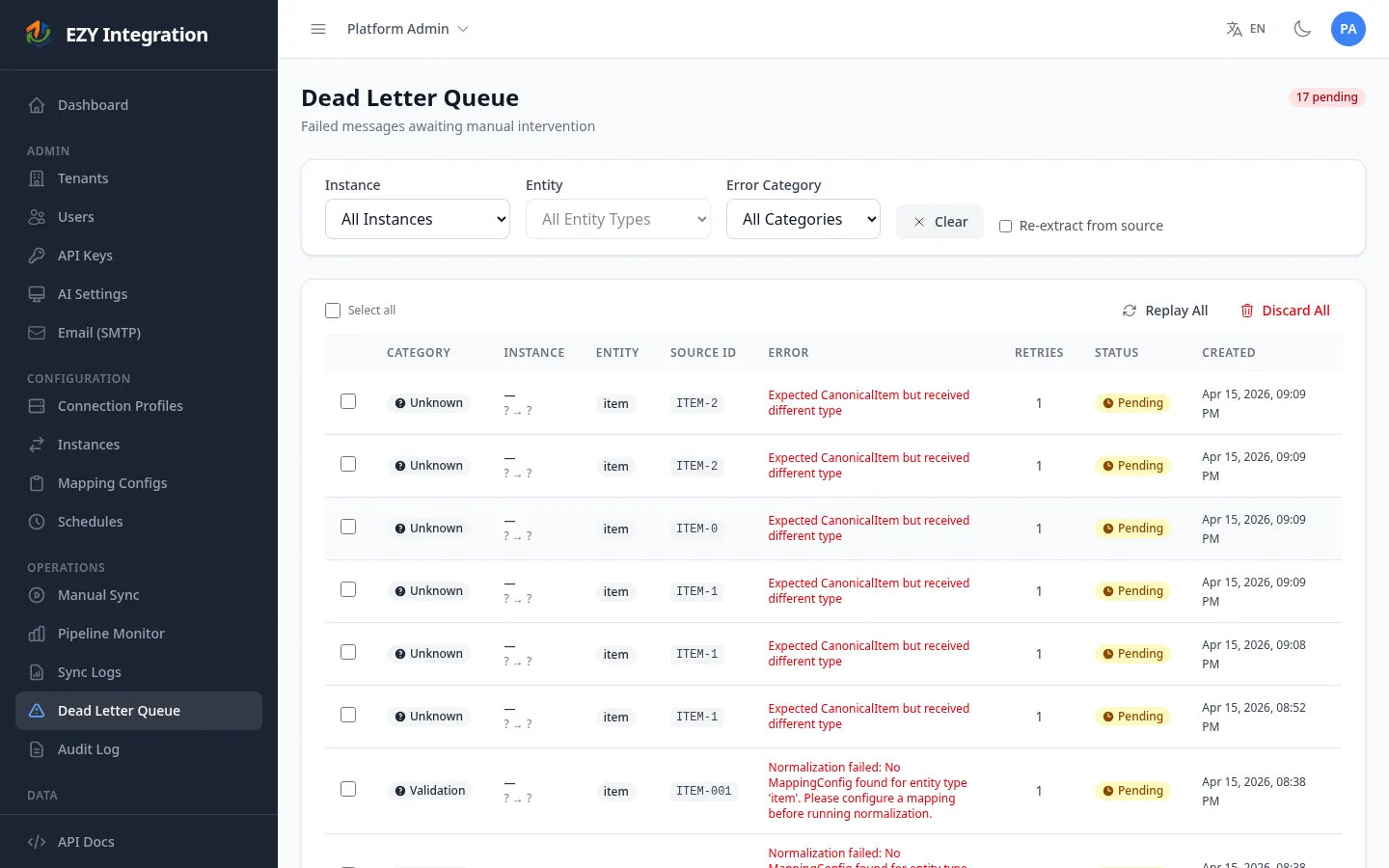
See DLQ and Replay for step-by-step replay instructions.
Auth and permission errors
Section titled “Auth and permission errors”| Symptom | Likely cause | Fix |
|---|---|---|
| ”Access denied” when opening a connection profile or instance | Your user account does not have permission to manage that resource. | Ask your administrator to assign you the appropriate role. See User Accounts. |
| Cannot delete an instance | The instance has execution history (sync logs, runs, or DLQ entries). Deletion is blocked to protect the audit trail. | Deactivate the instance instead of deleting it. |
| API key rejected on an inbound request | The API key was revoked or belongs to a different tenant. | Generate a new API key. See API Keys. |
What you can self-serve vs. escalate
Section titled “What you can self-serve vs. escalate”| You can resolve yourself | Escalate to your EZY support contact |
|---|---|
| Wrong credentials in a connection profile | Persistent Finalize-stage errors after other stages succeed |
| Incorrect field paths or missing fields in a mapping config | Integration service not processing any runs across all instances |
| Expired API keys or OAuth tokens | Errors that reference internal system state not visible in Sync Logs |
| DLQ messages with Validation or Rate Limit categories | Data corruption or duplicate records in the target system |
| Deactivating an instance that should no longer run | Billing, tenant provisioning, or environment changes |
Related pages
Section titled “Related pages”- Debugging Runs — Step-by-step playbook for diagnosing a failed run.
- DLQ and Replay — How to inspect and replay Dead Letter Queue messages.
- Contacting Support — What information to prepare before escalating.
- Pipeline Stages — Full reference for each stage and what can fail.