Activities
The Activities page shows all activities logged against deals in your CRM. Activities record the interactions and tasks associated with each deal: calls, emails, meetings, notes, tasks, and system-generated stage-change events. The list supports filtering by type, status, date range, assignee, and creator. Click any activity row to open a detail dialog.
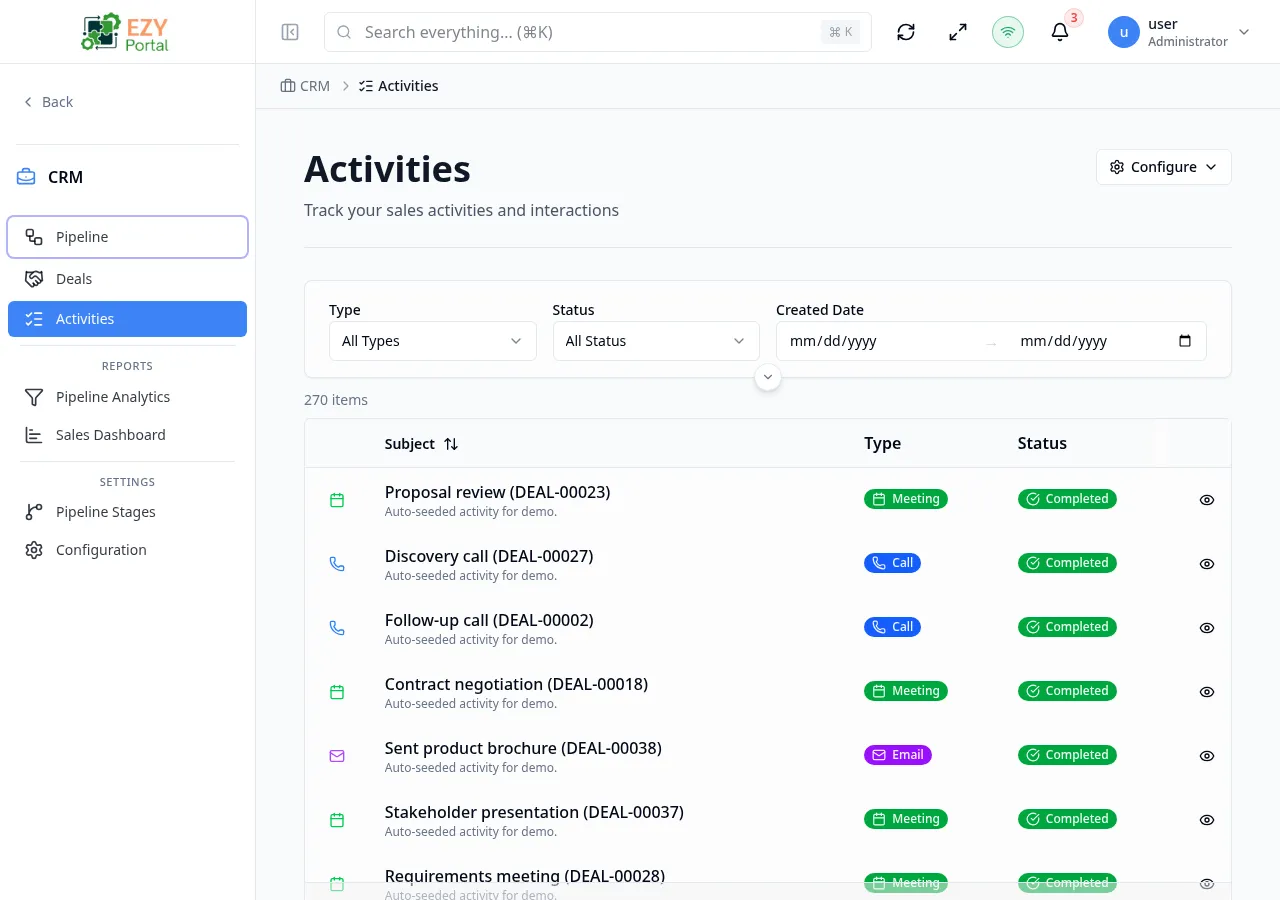
Accessing the Page
Section titled “Accessing the Page”- Route:
/activities - Menu Path: CRM → Activities
List Columns
Section titled “List Columns”| Column | Default Visible | Sortable | Description |
|---|---|---|---|
| Subject | Yes | Yes | Activity subject or title |
| Type | Yes | No | Activity type badge (Call, Email, Meeting, Note, Task, Stage Change) |
| Status | Yes | Yes | Scheduled, Completed, or Cancelled |
| Created | Yes | Yes | Date the activity was created |
| Duration | Yes | No | Duration in minutes, if recorded |
| Outcome | No | No | Outcome note from the activity |
| Created By | No | Yes | User who created the activity |
Activity Types
Section titled “Activity Types”| Type | Icon | Description |
|---|---|---|
| Call | Phone | Phone call logged against a deal |
| Envelope | Email interaction with a contact | |
| Meeting | Calendar | In-person or virtual meeting |
| Note | Document | Internal note or observation |
| Task | Checkbox | Action item assigned to a team member |
| Stage Change | Arrow | System-generated entry when a deal moves between stages |
Activity Statuses
Section titled “Activity Statuses”| Status | Description |
|---|---|
| Scheduled | Activity is planned but not yet completed |
| Completed | Activity has been finished |
| Cancelled | Activity was cancelled |
Filtering
Section titled “Filtering”| Filter | Type | Description |
|---|---|---|
| Search | Free text | Searches activity subjects |
| Type | Select | Filter by activity type (Call, Email, Meeting, Note, Task, Stage Change) |
| Status | Select | Filter by status (Scheduled, Completed, Cancelled) |
| Date From | Date | Show activities created on or after this date |
| Date To | Date | Show activities created on or before this date |
| Assigned To | User select | Filter by the user assigned to the activity |
| Created By | User select | Filter by the user who created the activity |
Active filter chips appear above the table. Click a chip’s X to remove that filter or click Clear all to reset.
The filter layout is configurable per user or per tenant.
Sorting
Section titled “Sorting”- First click on a column header — ascending
- Second click — descending
- Third click — removes sort
Default sort: Created descending (most recent first).
Pagination
Section titled “Pagination”The list uses Load More pagination:
- Page size: 20 records per load
- Click Load More at the bottom to fetch more
- Total count shown above the table
Viewing an Activity
Section titled “Viewing an Activity”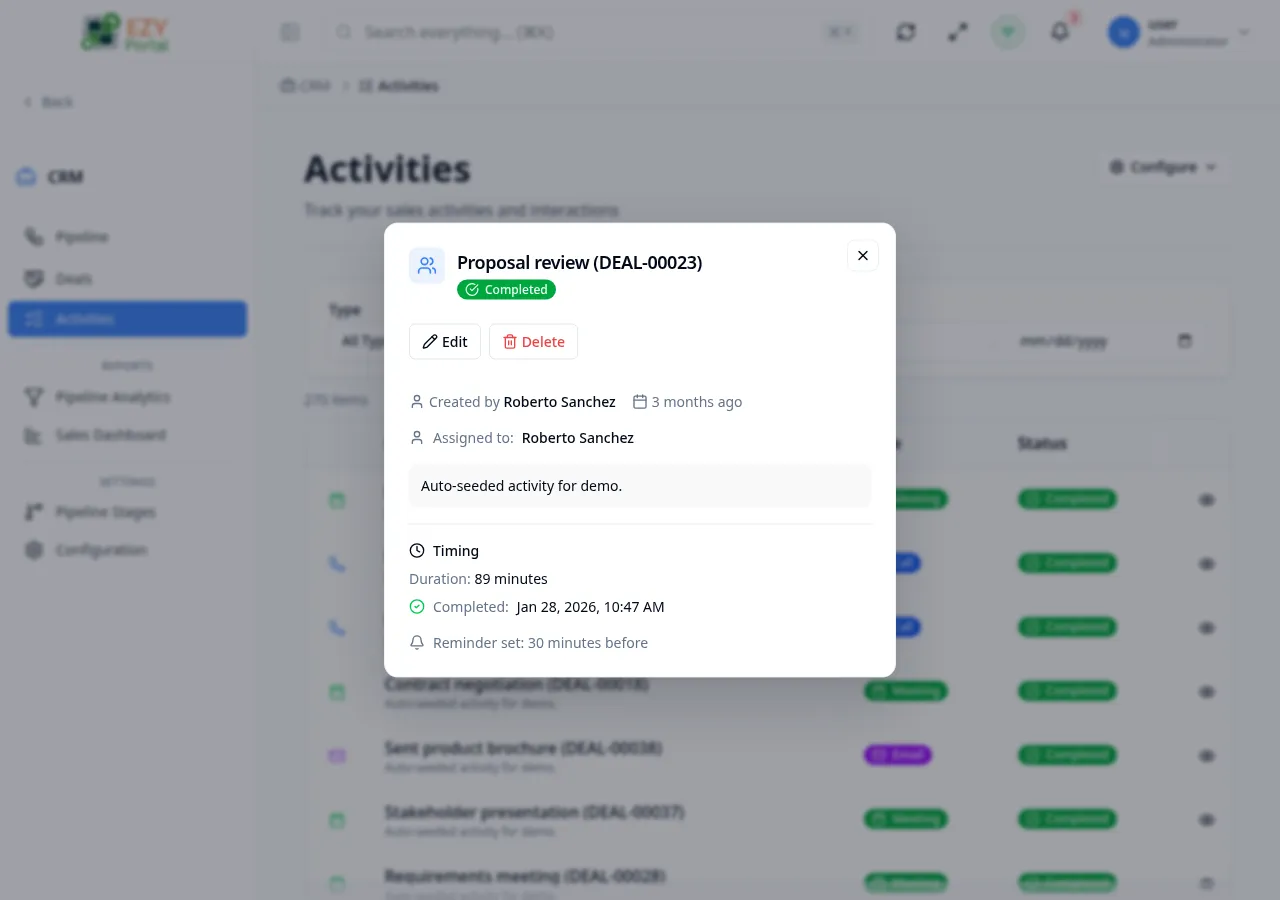
Click any row to open the Activity Detail dialog. The dialog shows:
- Activity type, subject, and status
- Description or outcome notes
- Scheduled and completed timestamps
- Duration
- Assignee and creator
The dialog is read-only. To edit an activity, open it from the Deal Detail Activities tab.
Actions
Section titled “Actions”Page Actions
Section titled “Page Actions”| Action | Description |
|---|---|
| Configure | Open the column/filter configuration menu |
Activities are created and edited from within the Deal Detail page’s Activities tab, not from this list page.
Common tasks
Section titled “Common tasks”- Open CRM → Activities from the sidebar.
- Use type or date filters to narrow down the activities you are looking for.
- Click a row to view activity details in the dialog.
Related Pages
Section titled “Related Pages”- Deal Detail — Create and manage activities on a specific deal
- Deal List — View all deals