Edit Stock Transfer
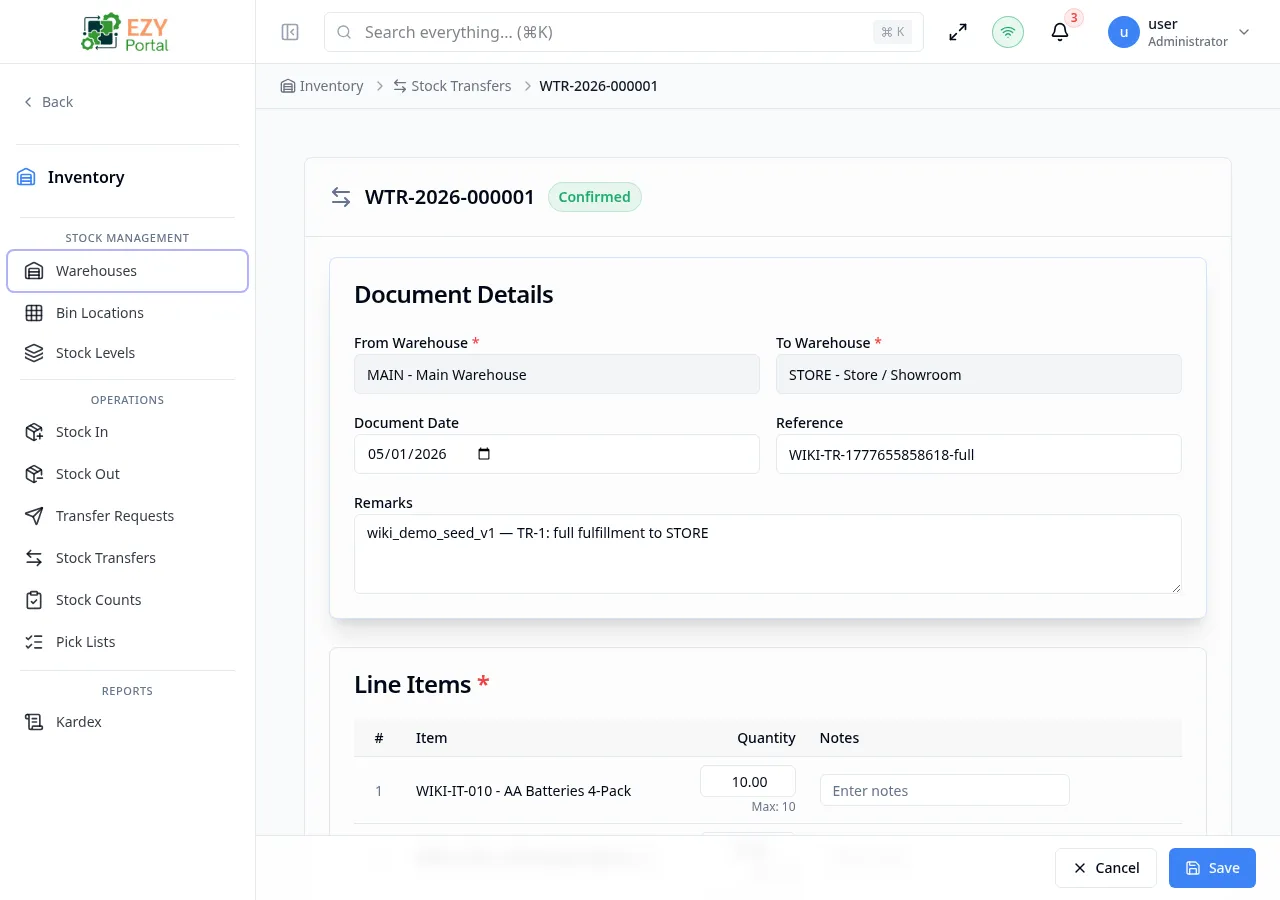
Update an existing Stock Transfer document that is still in Draft status. The edit form opens with all existing values pre-filled. Confirmed and Cancelled transfers cannot be edited.
Accessing the Page
Section titled “Accessing the Page”From the Stock Transfer Detail page, click Edit in the Actions menu, or navigate directly to /inventory/operations/transfers/:id/edit.
The Edit option is only visible when the document status is Draft.
Form Overview
Section titled “Form Overview”The edit form uses the same structure as Create Stock Transfer. The document number appears in the header as read-only.
When the transfer was created from a Transfer Request (copy-from mode), the From Warehouse and To Warehouse remain locked. The line items may be edited, but the available quantities are still constrained by the remaining quantities on the parent request.
Document Details
Section titled “Document Details”| Field | Required | Type | Description | Validation |
|---|---|---|---|---|
| From Warehouse | Yes | Entity select | Source warehouse | Must differ from To Warehouse; locked if created from a request |
| To Warehouse | Yes | Entity select | Destination warehouse | Must differ from From Warehouse; locked if created from a request |
| Document Date | No | Date | Transfer date | — |
| Reference | No | Text | External reference | — |
| Remarks | No | Textarea | Document-level notes | — |
Line Items
Section titled “Line Items”Existing lines are pre-filled. Add new lines with Add Line. Remove lines with the delete icon.
| Field | Required | Type | Description |
|---|---|---|---|
| Item | Yes | Entity select | Stock-tracked item |
| Quantity | Yes | Number | Must be greater than 0 |
| From Bin | Yes (Bin-Managed source) | Entity select | Source bin in From Warehouse |
| To Bin | Yes (Bin-Managed dest.) | Entity select | Destination bin in To Warehouse |
| Notes | No | Text | Line-level note |
Validation Rules
Section titled “Validation Rules”Same rules as Create Stock Transfer — both warehouses required and different, at least one line with a positive quantity, bin required for Bin-Managed warehouses.
Post-save behavior
Section titled “Post-save behavior”After saving, you are redirected to the Stock Transfer Detail page. Status remains Draft.
Common tasks
Section titled “Common tasks”- Open the Stock Transfer Detail for a Draft document.
- Click Edit.
- Adjust line items or bin assignments and click Save.
Permissions & system behavior
Section titled “Permissions & system behavior”- Editing requires Write permission on Operations.
- Only Draft documents can be edited.
Related Pages
Section titled “Related Pages”- Stock Transfers — List all transfer documents
- Stock Transfer Detail — View a specific transfer
- Create Stock Transfer — Create a new transfer