Generic API Connector
The Generic API connector delivers transformed records to any HTTP or REST endpoint. It is a target-only connector — it receives records that have already been extracted, normalized, and transformed by the pipeline and sends them as HTTP requests to an endpoint you specify. Use it to integrate with any system that accepts structured data over HTTP but does not have a dedicated connector.
When to use this connector
Section titled “When to use this connector”- You need to push data to a custom internal API or microservice.
- You want to forward records to a third-party SaaS platform that accepts webhook-style POST requests.
- You are posting data to a data warehouse or analytics ingest endpoint.
- The target system has an HTTP API but no native EZY Integrations connector.
Supported entity types
Section titled “Supported entity types”The Generic API connector accepts any entity type. Because it sends the transformed payload without interpreting its structure, it is compatible with every entity type the platform supports. The entity type affects only the canonical format used during the Normalize stage upstream of this connector.
| Entity type | Friendly name |
|---|---|
item | Item / Product |
bp | Business Partner |
customer | Customer |
bpgroup | Business Partner Group |
paymentterms | Payment Terms |
itemgroup | Item Group |
pricelist | Price List |
warehouse | Warehouse |
taxgroup | Tax Group |
uomgroup | Unit of Measure Group |
fiscalperiod | Fiscal Period |
salesquotation | Sales Quotation |
salesorder | Sales Order |
order | Order |
booking | Booking |
subscription | Subscription |
service | Service |
plan | Plan |
menuitem | Menu Item |
See Entity Types for descriptions of each type.
Prerequisites
Section titled “Prerequisites”Before creating a connection profile for the Generic API connector:
- You need the base URL of the target endpoint (for example,
https://api.example.com/ingest). - You need the authentication credentials the target system requires (API key, bearer token, or username and password).
- The endpoint must be reachable from the server running EZY Integrations. If the target uses a self-signed TLS certificate, you will need to enable the Skip TLS verification option.
- The target endpoint must accept the HTTP method and content type you configure (POST is the default;
application/jsonis the default content type).
Connection profile fields
Section titled “Connection profile fields”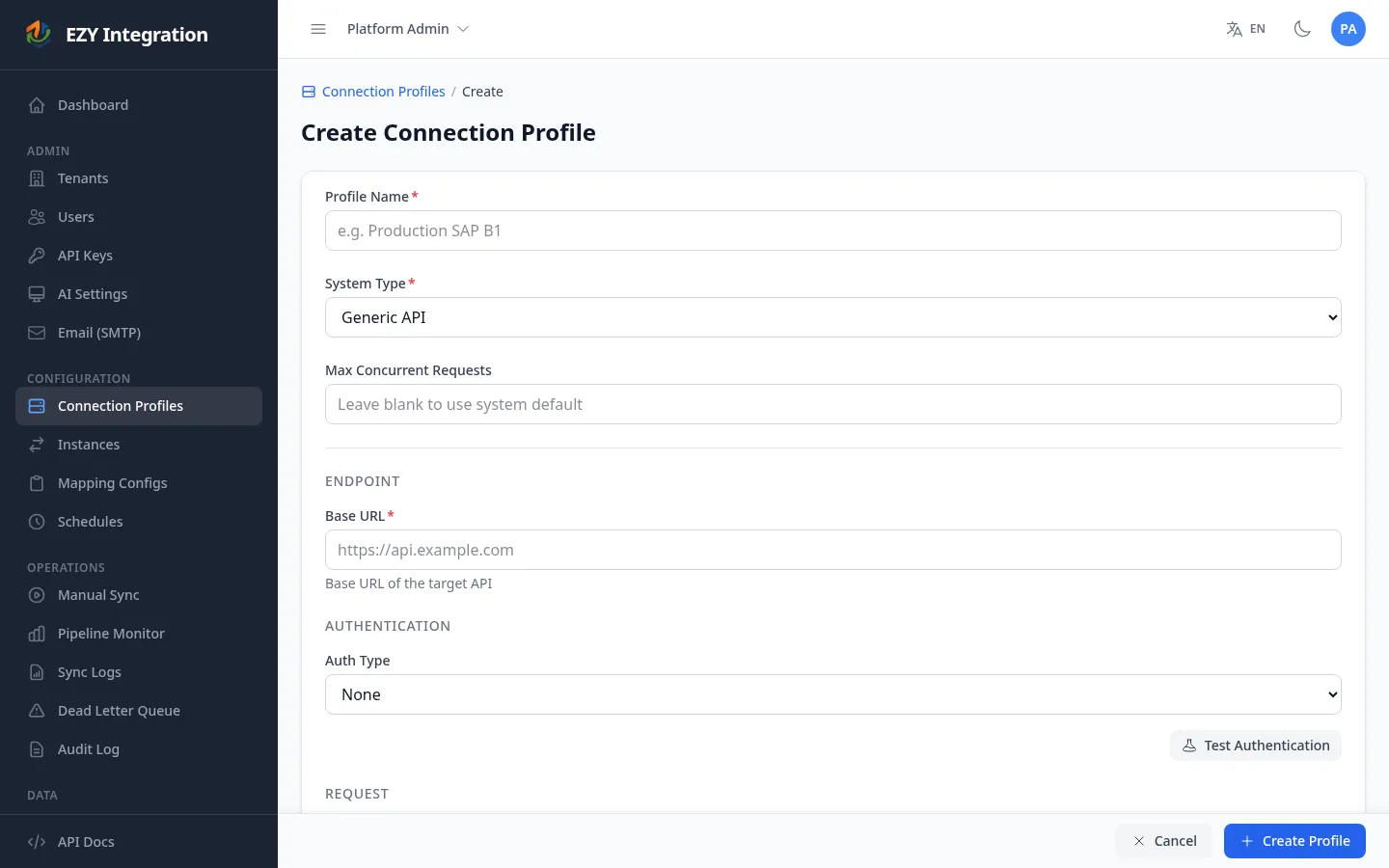
Endpoint
Section titled “Endpoint”| Field | Required | Description | Example value |
|---|---|---|---|
| Base URL | Yes | The URL the connector sends requests to. You can override this per-record in the mapping config using the _targetPath field (see Payload routing below). | https://api.example.com/ingest |
Authentication
Section titled “Authentication”| Field | Required | Description | Example value |
|---|---|---|---|
| Auth type | Yes | The authentication method. Choose one of: None, API Key, Bearer token, or Basic. | apikey |
| Header name | If Auth type = API Key | The HTTP header to set with the API key value. | X-Api-Key |
| Header value | If Auth type = API Key | The API key to send in the header. Stored encrypted. | <YOUR_API_KEY> |
| Bearer token | If Auth type = Bearer token | The bearer token included in the Authorization: Bearer header. Stored encrypted. | <YOUR_TOKEN> |
| Username | If Auth type = Basic | The username for HTTP Basic authentication. | integrations-user |
| Password | If Auth type = Basic | The password for HTTP Basic authentication. Stored encrypted. | <YOUR_PASSWORD> |
Request
Section titled “Request”| Field | Required | Description | Default |
|---|---|---|---|
| Content type | No | The Content-Type header value for the request body. | application/json |
| Skip TLS verification | No | When enabled, the connector skips TLS certificate validation. Use only in non-production environments where the target has a self-signed certificate. | Off |
Authentication modes
Section titled “Authentication modes”No authentication header is added. Use for endpoints on a private network or endpoints that rely on IP allowlisting.
API Key
Section titled “API Key”The connector adds a single HTTP header with the name and value you specify. Common header names are X-Api-Key, Authorization, or a system-specific name provided by the target API.
Bearer token
Section titled “Bearer token”The connector adds Authorization: Bearer <token> to every request.
The connector adds Authorization: Basic <base64(username:password)> to every request, following the HTTP Basic authentication standard.
Payload routing
Section titled “Payload routing”By default, every request is sent to the Base URL using HTTP POST. You can override both the URL path and the HTTP method from within your mapping configuration by including special control fields in the transformed payload:
| Control field | Effect | Allowed values |
|---|---|---|
_targetPath | Appended to the Base URL to form the final request URL. | Any valid URL path, for example /orders or /items/upsert |
_httpMethod | The HTTP method used for the request. | POST, PUT, PATCH |
These fields are removed from the payload before it is sent to the target — the target endpoint never receives them.
Example: If Base URL is https://api.example.com and the transformed payload contains "_targetPath": "/orders" and "_httpMethod": "PUT", the connector sends a PUT request to https://api.example.com/orders.
Response handling
Section titled “Response handling”- A response with an HTTP 2xx status code is treated as success.
- A response with any other status code is treated as a failure. The status code and response body are recorded in the run log and the record is retried according to the pipeline retry policy.
- If the response body is valid JSON and contains a top-level
idfield, that value is stored as the target entity identifier for future create-vs-update reconciliation. - If the response is not JSON or does not contain an
idfield, the connector uses the identifier passed in from the Transform stage.
Known limitations
Section titled “Known limitations”- Target-only. The Generic API connector cannot be used as a source — it has no extractor. It always appears on the target side of a job.
- No retry after HTTP 4xx. Client errors (4xx responses) are recorded as failures and sent to the Dead Letter Queue after the retry limit is reached. If the target returns a 429 (rate limit), the record will also eventually land in the Dead Letter Queue; consider adjusting job scheduling to reduce throughput.
- No response schema validation. The connector does not validate the response body beyond checking for the
idfield. Payload correctness is the responsibility of the mapping configuration. - Skip TLS is for non-production use only. Enabling Skip TLS verification removes certificate validation entirely. Do not use it against production endpoints.
- POST is the default method. If the target endpoint requires GET or DELETE, those methods are not supported. Only POST, PUT, and PATCH are available.
Related
Section titled “Related”- Entity Types — Full list of supported entity types.
- Architecture Overview — How the Generic API connector fits into the pipeline as a target.
- Jobs Overview — How to configure a job that uses this connector as a target.
- Connectors Overview — Compare all available connectors.