A/R Credit Memos
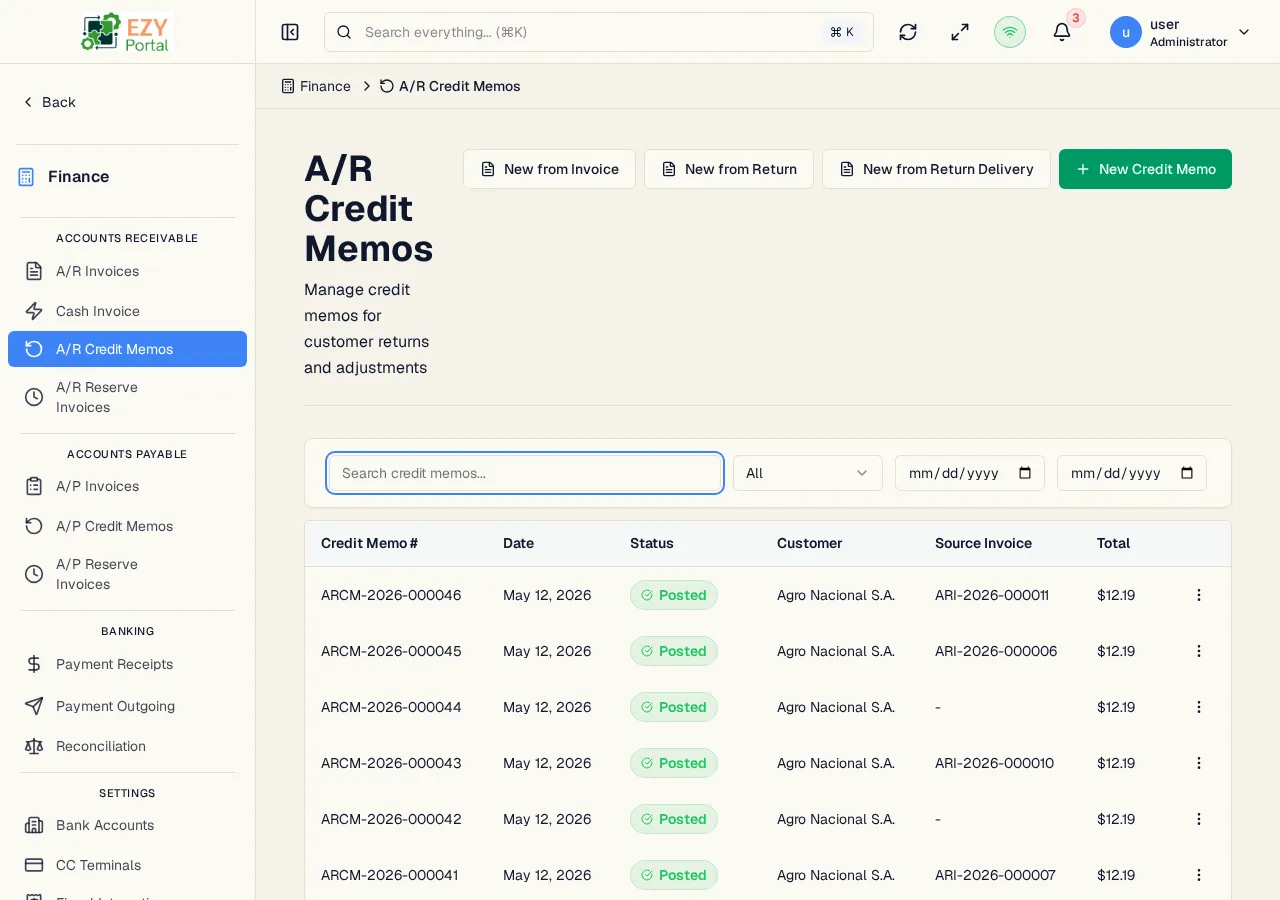
The A/R Credit Memos list displays all accounts receivable credit memos in the system. Credit memos are used to reduce or reverse amounts owed on A/R invoices — for example, to process product returns, apply discounts after invoicing, or correct billing errors.
Accessing the Page
Section titled “Accessing the Page”Navigate to Finance → Accounts Receivable → A/R Credit Memos in the sidebar, or go to /finance/ar/credit-memos.
List Columns
Section titled “List Columns”| Column | Default Visible | Sortable | Description |
|---|---|---|---|
| Document # | Yes | Yes | System-assigned credit memo number |
| Date | Yes | Yes | Credit memo document date |
| Status | Yes | Yes | Status badge |
| Customer | Yes | Yes | Business partner name |
| Source Invoice | Yes | No | The original A/R Invoice this memo is linked to, if any |
| Total | Yes | Yes | Grand total credit amount (currency formatted) |
Status Values
Section titled “Status Values”| Status | Description |
|---|---|
| Draft | Credit memo is being prepared; not yet posted |
| Posted | Credit memo is posted and applied (or available to apply) against invoices |
| Cancelled | Credit memo has been cancelled |
Filtering
Section titled “Filtering”| Filter | Type | Description |
|---|---|---|
| Search | Free text | Searches by credit memo number or customer name |
| Status | Select | Filter by status: Draft, Posted, Cancelled |
| Date From | Date | Start of the document date range |
| Date To | Date | End of the document date range |
Sorting
Section titled “Sorting”Click any sortable column header to sort ascending, then descending, then remove sort. Default sort: Created date descending.
Pagination
Section titled “Pagination”Load More pattern with 20 records per page. Total count displayed above the table.
Actions
Section titled “Actions”Page Actions
Section titled “Page Actions”| Action | Description | Permission |
|---|---|---|
| New from Invoice | Open an invoice search dialog to select a posted invoice and pre-fill the credit memo from its lines | canCreateARCreditMemo |
| New from Return | Create a credit memo from a confirmed Customer Return document | canCreateARCreditMemo |
| New from Return Delivery | Create a credit memo from a confirmed Return Delivery document | canCreateARCreditMemo |
| New Credit Memo | Open the Create A/R Credit Memo form for a standalone credit memo | canCreateARCreditMemo |
Row Actions
Section titled “Row Actions”| Action | Description | Permission |
|---|---|---|
| View | Navigate to the A/R Credit Memo Detail page | Any |
| Edit | Navigate to the Edit A/R Credit Memo form | canEditARCreditMemo |
| Post | Transition a Draft credit memo to Posted status | canEditARCreditMemo |
| Cancel | Cancel the credit memo | canEditARCreditMemo |
| Duplicate | Create a new Draft copy of the credit memo | canCreateARCreditMemo |
| Delete | Delete a Draft credit memo permanently | canDeleteARCreditMemo |
Deleting an A/R Credit Memo
Section titled “Deleting an A/R Credit Memo”- Click the row actions menu and select Delete
- A confirmation dialog warns that the action is permanent
- Click Delete to confirm
Only Draft credit memos can be deleted.
- Stocked-item credit memos must originate from a Customer Return or Return Delivery before posting.
Common tasks
Section titled “Common tasks”- Open the page from the sidebar under Finance → Accounts Receivable.
- Use filters to find credit memos by status or date.
- Click New from Invoice to create a credit memo against a specific posted invoice.
Related Pages
Section titled “Related Pages”- Create A/R Credit Memo — Create a new credit memo
- A/R Credit Memo Detail — View and manage a credit memo
- Edit A/R Credit Memo — Edit a Draft credit memo
- A/R Invoices — Source invoices for credit memos
- Reconciliation — Apply receipts to invoices