CRM Configuration
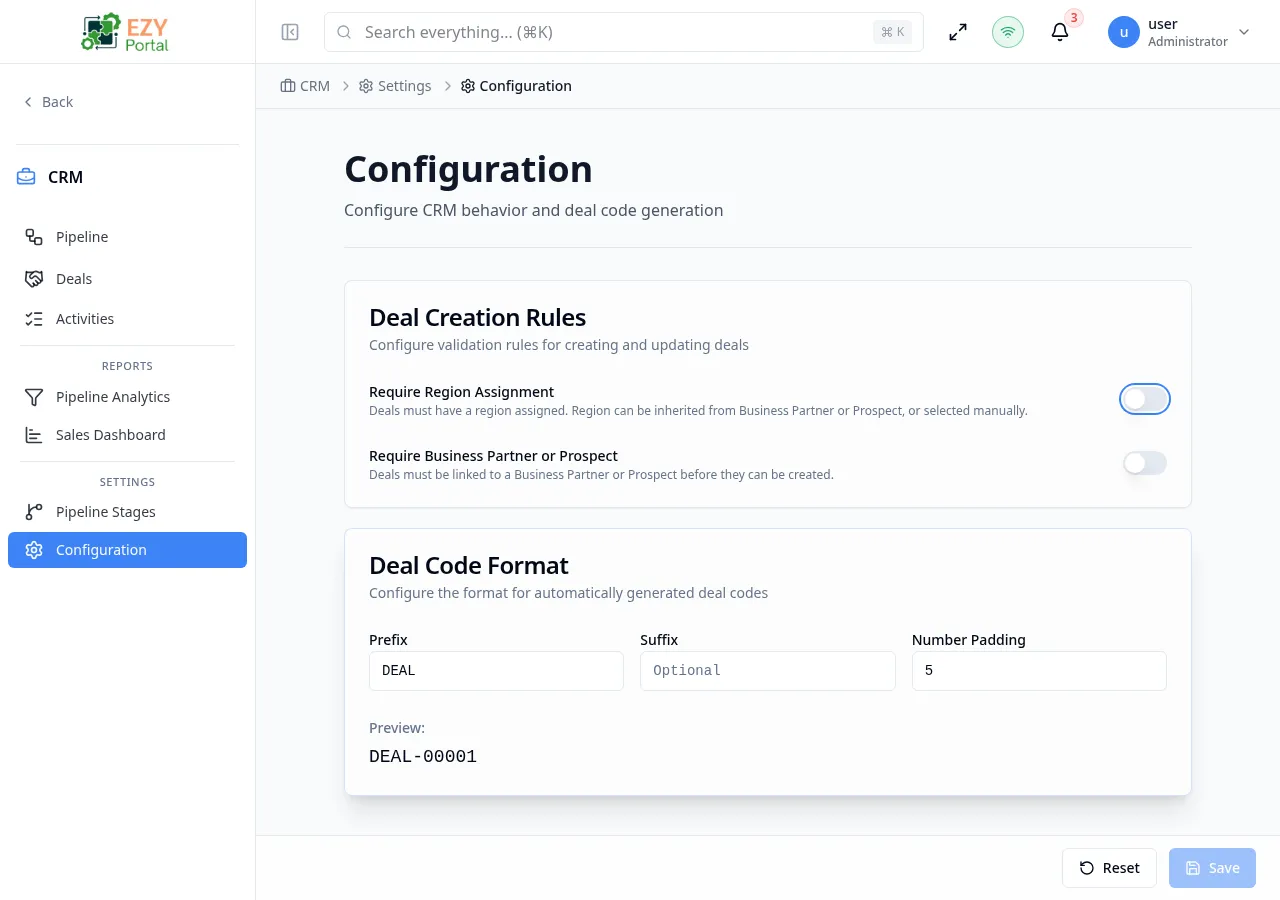
CRM Configuration controls two areas: deal creation validation rules that apply across the entire tenant, and the format of auto-generated deal codes. Changes here affect all users in the tenant. This page is accessible only to superusers.
Accessing the Page
Section titled “Accessing the Page”- Route:
/settings/configuration - Menu Path: CRM → Settings → Configuration
- Primary audience: Superusers only. Non-superusers see an access-denied message.
What you can do here
Section titled “What you can do here”- Require every deal to be assigned to a geographic region.
- Require every deal to be linked to a prospect or business partner.
- Set the prefix, suffix, and zero-padding used in auto-generated deal codes.
- Preview the generated code format before saving.
Common tasks
Section titled “Common tasks”- Open CRM → Settings → Configuration.
- Toggle the deal creation rules as needed.
- Adjust the deal code prefix if your organization uses a different code convention.
- Click Save to apply. Changes take effect on the next deal creation.
- Only superusers can access this page. Other users see an access-denied screen.
- Changing the Prefix shows a warning: existing deal codes are not affected; only new deals use the new prefix. Confirm the change to proceed.
- If Require Region Assignment is on, users creating deals with a Direct source must select a region. If the linked prospect or BP has no region, creation is blocked until the entity is updated.
- If Require BP or Prospect is on, the Direct (manual contact) option is hidden on the Create Deal form.
Deal Creation Rules
Section titled “Deal Creation Rules”Fields
Section titled “Fields”| Field | Required | Type | Description | Default | Validation |
|---|---|---|---|---|---|
| Require Region Assignment | — | Toggle | When on, every deal must be assigned to a region. Direct deals must pick a region; linked deals inherit it from the prospect or BP (which must also have a region). | Off | — |
| Require Business Partner or Prospect | — | Toggle | When on, the “New Contact (Direct)” option is hidden on the Create Deal form. All deals must be linked to a prospect or business partner. | Off | — |
Deal Code Format
Section titled “Deal Code Format”Fields
Section titled “Fields”| Field | Required | Type | Description | Default | Validation |
|---|---|---|---|---|---|
| Prefix | No | Text | Text prepended to the deal number (auto-uppercased) | DEAL | — |
| Suffix | No | Text | Text appended after the number (auto-uppercased, optional) | — | — |
| Number Padding | No | Number | Total digit width of the numeric portion; shorter numbers are zero-padded | 5 | 1–10 |
Preview — a live preview below the fields shows what the next generated code will look like. For example, with Prefix DEAL, no suffix, and padding 5, the first deal code is DEAL-00001.
Prefix Change Warning
Section titled “Prefix Change Warning”Changing the Prefix value triggers a confirmation dialog:
“Changing the prefix will affect new deals only. Existing deals will keep their current codes. Are you sure you want to continue?”
Click Yes, Change Prefix to confirm or Cancel to revert.
Related Pages
Section titled “Related Pages”- Stage Settings — Configure pipeline stages
- Create Deal — How deal creation rules affect the form