View comprehensive information about an A/R Credit Memo including header data, line items, the linked source invoice (if any), totals, and available workflow actions.
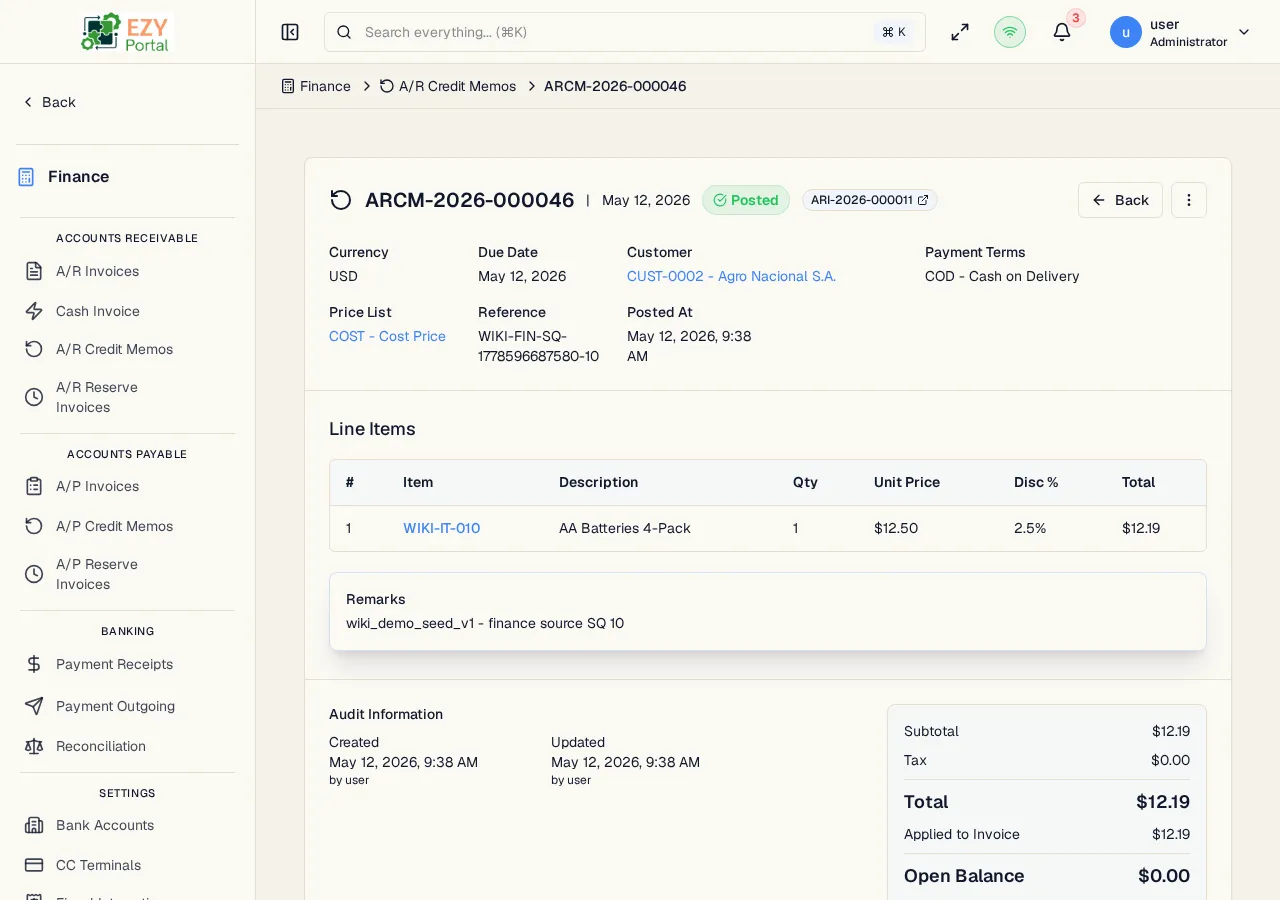
From the A/R Credit Memos list, click any row, or navigate directly to /finance/ar/credit-memos/:id.
| Button | Description | Permission |
|---|
| Back | Return to the A/R Credit Memos list | Any |
| History | Open the entity history dialog | Any |
| Edit | Open the Edit A/R Credit Memo form (Draft only) | canEditARCreditMemo |
| Delete | Delete the credit memo (Draft only) | canDeleteARCreditMemo |
| Post | Transition from Draft to Posted | canEditARCreditMemo |
| Cancel | Cancel the credit memo | canEditARCreditMemo |
| Duplicate | Create a new Draft copy | canCreateARCreditMemo |
| Export PDF | Download as PDF | Any |
| Field | Description |
|---|
| Document Number | System-assigned credit memo number |
| Status | Current lifecycle status |
| Customer | Business partner name and code |
| Document Date | Credit memo date |
| Due Date | Application due date |
| Currency | Transaction currency |
| Source Invoice | Linked source A/R Invoice number (if applicable) |
| Reference | External reference |
| Contact | Assigned contact person |
| Billing Address | Billing address |
| Shipping Address | Shipping address |
| Payment Terms | Assigned payment terms |
| Price List | Price list used |
| Remarks | Free-text notes |
| Column | Description |
|---|
| # | Line number |
| Item | Item code and name |
| Description | Line description |
| Qty | Quantity credited |
| Unit Price | Price per unit |
| Disc % | Line discount |
| Tax Category | Tax category code |
| Tax Amount | Computed tax |
| Warehouse | Warehouse |
| Total | Line total |
| Field | Description |
|---|
| Subtotal | Sum of line amounts before discount |
| Discount | Total discount amount |
| Tax Total | Total tax amount |
| Grand Total | Final credit total |
- Click Delete in the action bar (Draft only)
- Confirm in the dialog
- You are redirected to the credit memos list
- Post transitions the credit memo to Posted status. Posted credit memos reduce the customer’s outstanding balance and can be applied against invoices through the Reconciliation screen.
- When a credit memo is linked to a source invoice, the source invoice status updates automatically (e.g., to Partially Credited or Credited) as the credit is applied.
- Cancellation is available at any stage.
- Stocked-item credit memo lines must come from a Customer Return or Return Delivery before the credit memo can be posted.
- Open a credit memo from the list.
- Review header and lines to verify the credit amount.
- Click Post to apply the credit to the customer’s account.