The Project Governance Settings page lets superusers configure how ownership, participants, and workflow status are enforced across all projects and tasks in the tenant. Changes take effect immediately for all subsequent project and task operations.
Open Projects from the sidebar and navigate to Settings → Project Settings. This page is visible only to users with superuser access.
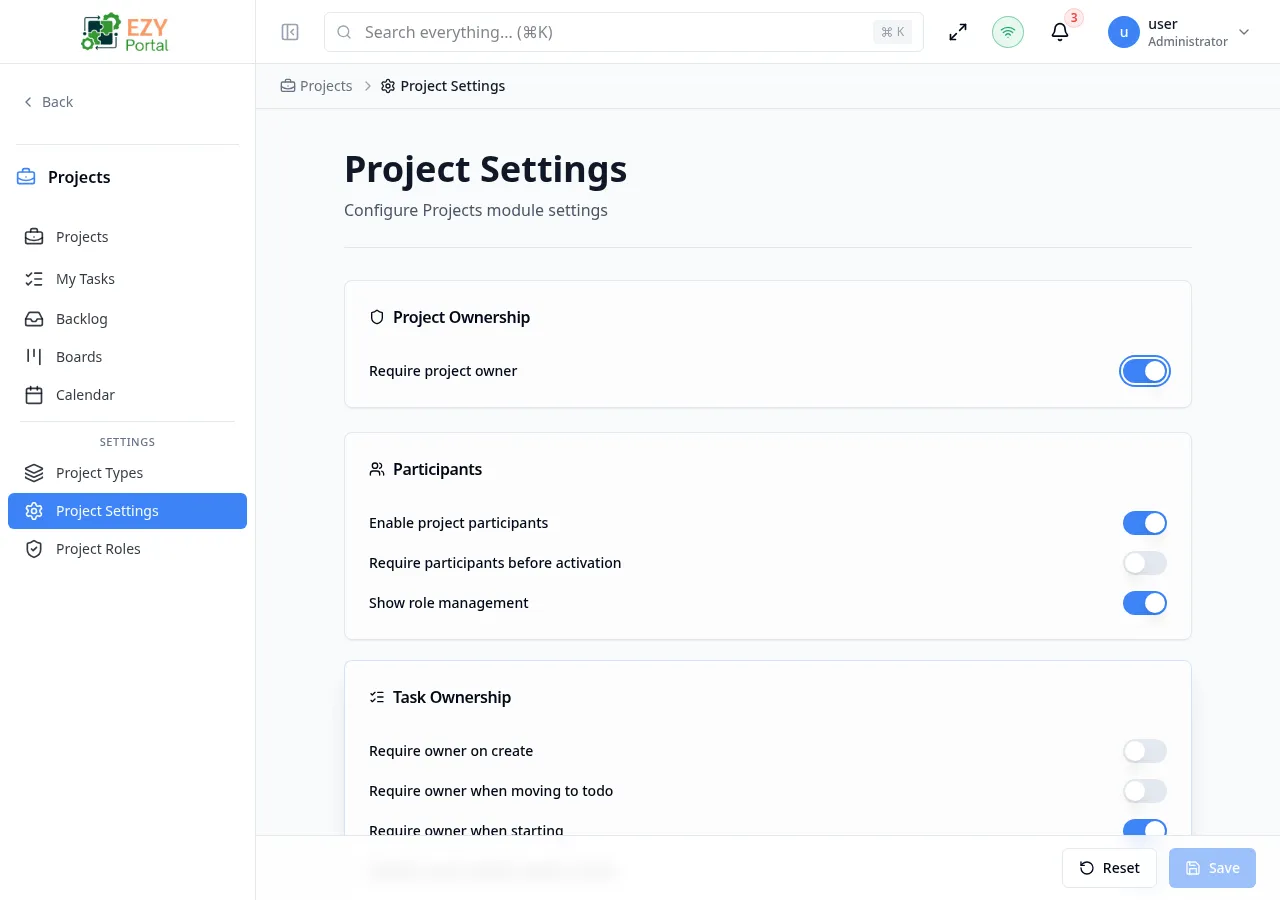
| Setting | Default | Description |
|---|
| Require project owner | On | When enabled, a project cannot be saved without an owner assigned. Applies to both Create and Edit Project dialogs. |
| Setting | Default | Description |
|---|
| Enable project participants | On | Enables the Participants panel on project detail pages and makes participant management available. When disabled, all participant settings below are inactive. |
| Require participants before activation | Off | When enabled, a project must have at least one participant before it can be moved from Draft to Active. New projects default to Draft status when this setting is active. |
| Show role management | On | Controls whether the Project Roles section appears in the sidebar and whether the role selector is shown on the Participants panel. Requires participants to be enabled. |
| Setting | Default | Description |
|---|
| Require owner on create | Off | When enabled, every new task must have an assignee set before it can be saved. |
| Require owner when moving to To Do | Off | When enabled, moving a task to the To Do status requires an assignee. |
| Require owner when starting | On | When enabled, moving a task to In Progress requires an assignee. |
| Require owner before review or done | On | When enabled, moving a task to Review or Done requires an assignee. |
| Default owner strategy | None | Controls how the Assignee field is pre-filled when a new task is created. Options: None (field is empty), Creator (the user creating the task is auto-assigned), Project owner (the project’s owner is auto-assigned). |
| Setting | Default | Description |
|---|
| Enforce ownership by status | On | Master switch for status-based ownership enforcement. When disabled, the status-specific owner requirements above are not checked. |
| Blocked statuses without owner | In Progress, Review, Done | Statuses that require an assignee. Only relevant when Enforce ownership by status is on. Choose from: To Do, In Progress, Review, Done. |
| Setting | Default | Description |
|---|
| Allow unassigned backlog tasks | On | When off, even Backlog tasks require an assignee. |
| Allow multiple assignees | Off | When enabled, tasks can have more than one assignee. |
| Setting | Default | Description |
|---|
| Task open mode | Slide-over | Controls how task detail opens when you click a task row. Slide-over opens a side panel; Page navigates to the full task detail page. |
| Project open mode | Page | Controls how project detail opens when you click a project row. Slide-over opens a side panel; Page navigates to the full project detail page. |
The page uses a dirty-state form. The Save button is enabled only when one or more settings have been changed. Click Save to apply changes, or Reset to discard edits and restore the last saved values.
When an owner requirement blocks a task action, the system shows a recovery dialog prompting the user to assign an owner before the status change can proceed. This dialog appears inline on Boards, Backlog, Task Detail, and My Tasks pages so users can resolve the requirement without leaving their current context.
| Rule | Behavior |
|---|
| Participants required on activation | Attempting to activate a project with zero participants returns an error: “Project participants are required before activation.” |
| Task owner required for status | Saving or moving a task to a blocked status without an assignee returns an error: “Task owner is required for this status.” |
| Last participant removal blocked | Removing the last participant from an Active project is blocked if Require participants before activation is enabled. |
| Duplicate participant | Adding a user who is already a participant on the project is blocked with a warning. |
This page requires superuser access. Users without superuser permission see an access-denied message and cannot read or change any settings. Standard project-write users are not able to reach this page.