Return Delivery Detail
View the complete details of a return delivery including document header, all line items with batch tracking, financial totals, and the current workflow status. Confirming a return delivery commits the inventory movement and adds the returned goods back to the warehouse.
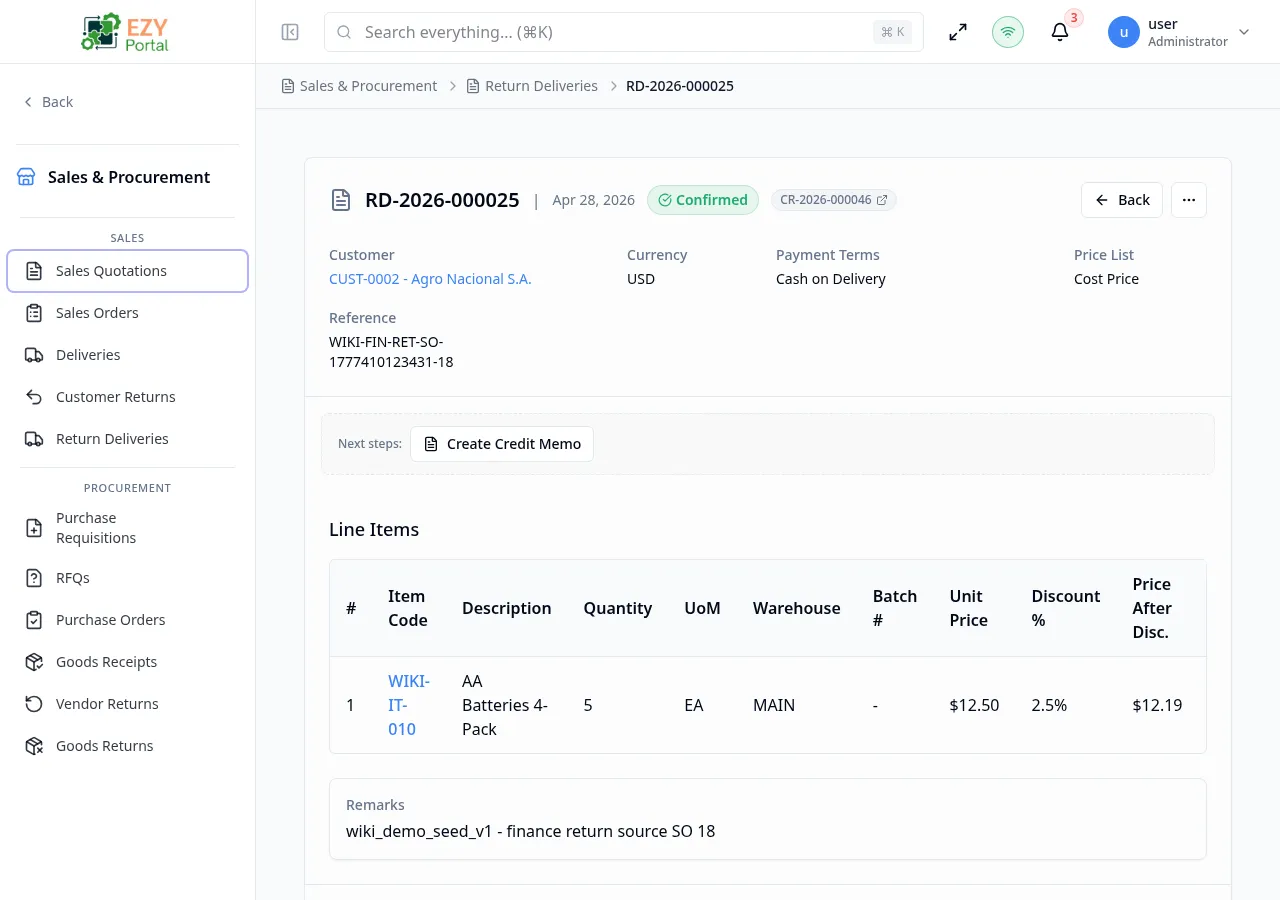
Accessing the Page
Section titled “Accessing the Page”From the Return Deliveries list, click any row, or navigate directly to /commerce/sales/return-deliveries/:id.
Header / Action Bar
Section titled “Header / Action Bar”| Button | Description | Available When |
|---|---|---|
| Back | Return to the Return Deliveries list | Always |
| History | Open the document change history dialog | Always |
| Edit | Open the Edit Return Delivery form | Draft only |
| Duplicate | Create a copy as a new Draft | Always |
| Delete | Delete after confirmation | Draft only |
| Confirm | Transition Draft → Confirmed; commits inventory receipt | Draft |
| Cancel | Transition Draft → Cancelled (requires reason) | Draft |
| Create Credit Memo | Shortcut to A/R credit memo creation | Confirmed |
| Export PDF | Download the return delivery as a PDF | Always (if configured) |
Summary Card
Section titled “Summary Card”| Field | Description |
|---|---|
| Document Number | System-generated return delivery number |
| Status | Current status badge |
| Customer | Business partner name and code |
| Date | Document date |
| Currency | Transaction currency |
| Sales Person | Assigned sales person |
| Payment Terms | Payment terms |
| Price List | Applied price list |
| Contact | Customer contact |
| Billing Address | Billing address |
| Shipping Address | Shipping address |
| Reference | External reference |
| Remarks | Remarks |
Line Items
Section titled “Line Items”| Column | Description |
|---|---|
| # | Line number |
| Item | Item code and name |
| Description | Line description |
| Qty | Received quantity |
| UoM | Unit of measure |
| Warehouse | Destination warehouse |
| Batch # | Batch number (if applicable) |
| Unit Price | Credit price per unit (may be masked) |
| Disc % | Line discount |
| Price After Disc. | Price after discount (may be masked) |
| Tax Category | Tax category |
| Tax Amount | Tax amount (may be masked) |
| Line Total | Line total (may be masked) |
Document Totals
Section titled “Document Totals”| Field | Description |
|---|---|
| Total Quantity | Sum of all return quantities |
| Subtotal | Sum of line totals before discount |
| Discount | Document-level discount |
| Tax | Total tax |
| Grand Total | Final total |
Workflow States
Section titled “Workflow States”graph LR
DRAFT -->|Confirm| CONFIRMED
DRAFT -->|Cancel| CANCELLED
Confirming a return delivery is a terminal action — inventory is received and the document is locked.
Deleting a Return Delivery
Section titled “Deleting a Return Delivery”- Verify the return delivery is in Draft status.
- Click Delete in the action bar.
- Confirm the deletion.
- You are redirected to the Return Deliveries list.
Business Rule Notes
Section titled “Business Rule Notes”- Confirming a return delivery commits the inventory receipt. Goods are added back to the destination warehouse.
- After confirmation, the related Customer Return may automatically move to Closed status if all return lines are fulfilled.
- Cancellation requires a written reason and is irreversible.
Common tasks
Section titled “Common tasks”- Open the page from the Return Deliveries list.
- Review line items, quantities, and batch numbers.
- Click Confirm to commit the inventory receipt.
Related Pages
Section titled “Related Pages”- Return Deliveries — List all return deliveries
- Create Return Delivery — Create a new return delivery
- Edit Return Delivery — Edit a draft return delivery
- Customer Returns — Source returns