The Vendor Returns list shows all vendor return authorization documents. A Vendor Return is a commitment to return goods to a vendor after they were received — the procurement equivalent of an RMA. Vendor Returns are always created from a confirmed Goods Receipt, and serve as the source document for one or more Goods Returns (the physical shipments back to the vendor) and for A/P Credit Memos in finance.
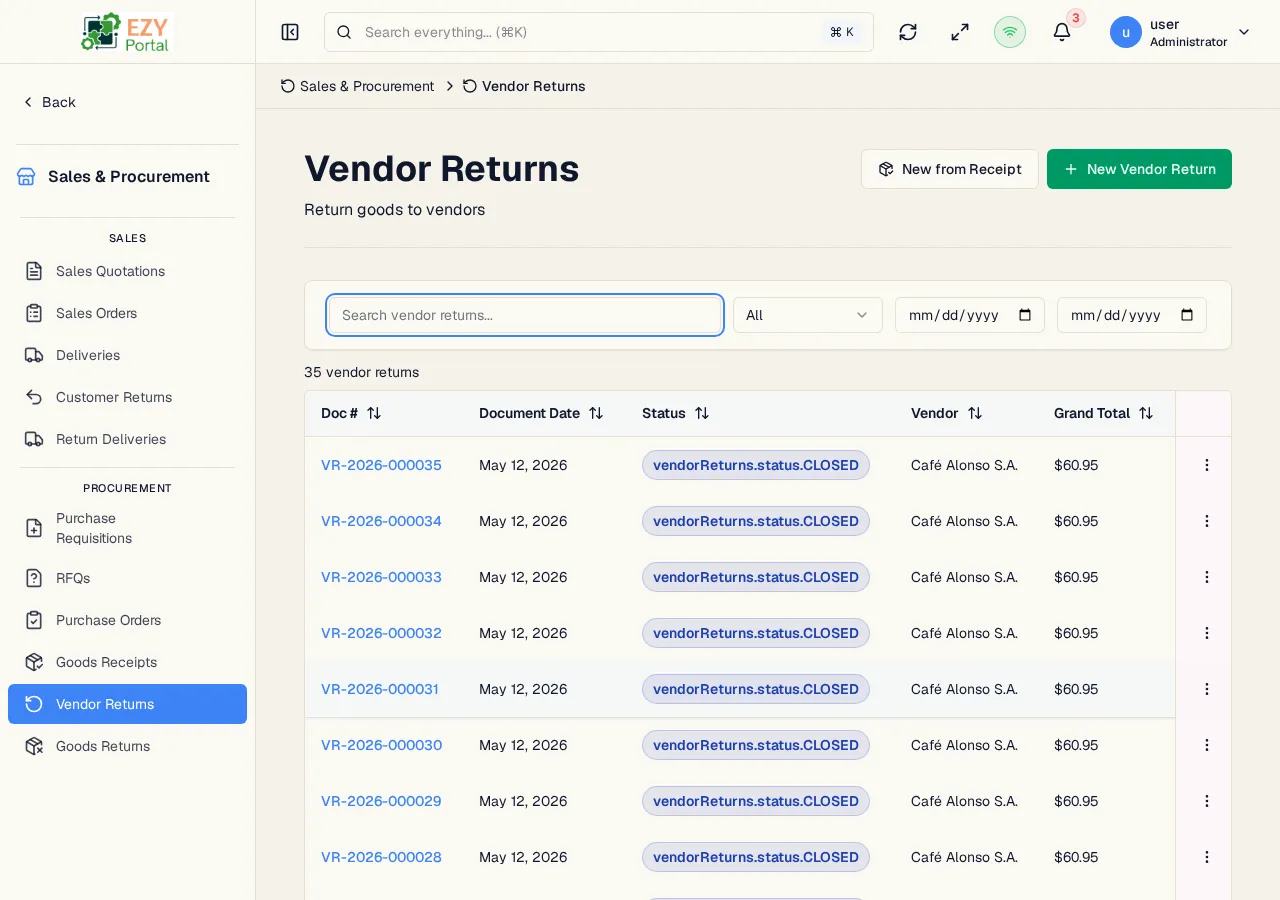
Navigate to Commerce → Procurement → Vendor Returns in the sidebar, or go to /commerce/procurement/vendor-returns.
- A Vendor Return is always created from a confirmed Goods Receipt. The per-line return quantity is capped by the receipt line’s received quantity minus the quantity already committed to other non-cancelled Vendor Returns.
- A Vendor Return does not move inventory by itself — it is an authorization. Inventory is decremented only when a Goods Return that targets the Vendor Return is confirmed.
- Confirmed is a terminal status for Vendor Returns — there is no transition out of Confirmed. To stop fulfilling a confirmed Vendor Return, cancel its open Goods Returns instead.
- The requesting document auto-closes when its fulfillment becomes complete: once all Vendor Return lines are fully fulfilled by confirmed Goods Returns, the document status flips automatically.
- Browse all vendor return authorizations with filtering by status and date.
- Search by document number or vendor name.
- Create a new Vendor Return from a confirmed Goods Receipt.
- Confirm or cancel vendor returns.
- Download a PDF copy of the vendor return.
- Track outstanding fulfillment per line — fulfilled quantity comes from confirmed Goods Returns.
- Open Commerce → Procurement → Vendor Returns from the sidebar.
- Click New from Goods Receipt, pick the original receipt, choose the lines and return quantities, and save as Draft.
- Confirm the Vendor Return.
- Create a Goods Return against the Vendor Return to physically ship the goods back and decrement inventory.
| Column | Default Visible | Sortable | Description |
|---|
| Doc # | Yes | Yes | System-generated Vendor Return number |
| Date | Yes | Yes | Document date |
| Status | Yes | Yes | Workflow status badge |
| Vendor | Yes | No | Business partner (vendor) name |
| Grand Total | Yes | Yes | Total amount including tax |
| Status | Description |
|---|
| Draft | Authorization is being prepared; editable and deletable |
| Confirmed | Authorization is committed; downstream Goods Returns may be created. Terminal state — to stop fulfilling, cancel the related Goods Returns instead. |
| Cancelled | Authorization was cancelled from Draft |
| Filter | Type | Description |
|---|
| Search | Free text | Searches across document number and vendor name |
| Status | Dropdown | Filter by status |
| Date From / To | Date | Document-date range filter |
Click any sortable column header to sort. Default sort: Created descending. The list uses a Load More pattern with 20 records per load.
| Action | Description | Permission |
|---|
| New from Goods Receipt | Open a picker to select a confirmed Goods Receipt with returnable lines; the Vendor Return pre-fills with the receipt’s lines and remaining returnable quantities | Write |
| Action | Description | Permission |
|---|
| View | Open the Vendor Return detail page | Read |
| Edit | Edit the authorization — Draft only | Write |
| Confirm | Transition Draft → Confirmed | Write |
| Cancel | Transition Draft → Cancelled. Confirmed Vendor Returns cannot be cancelled directly. | Write |
| Download PDF | Download a PDF copy of the document | Read |
| Delete | Permanently delete — Draft only | Admin |
| Section | Field | Notes |
|---|
| Header | Vendor | Locked to the source Goods Receipt’s vendor |
| Header | Document Date | Defaults to today |
| Header | Contact | From the BP’s contact list |
| Header | Return Reason | Free-text — why the goods are being returned |
| Header | Billing / Shipping Address | Pre-filled from the vendor |
| Lines | Item, Description | Locked to the receipt line |
| Lines | Warehouse | Source warehouse for the return |
| Lines | Quantity | Defaults to the open returnable quantity; can be reduced |
| Lines | Unit Price, Discount %, Tax Category | Locked to the receipt line |
| Lines | Notes | Per-line free-text |
| Footer | Payment Terms, Price List | Locked to the receipt |
| Footer | Received By | Employee who recorded the return |
| Footer | Reference | External reference |
Each Vendor Return line tracks Fulfilled Quantity, which is updated when a Goods Return targeting the line is confirmed. The fulfillment API exposes the open quantity to A/P Credit Memo creation in finance.
- Confirming a Vendor Return publishes
commerce.vendor-return.confirmed. It has no direct inventory effect — inventory is only moved when a Goods Return is confirmed. The fulfillment API exposes the lines so Finance can create an A/P Credit Memo against the authorization.
- Cancelling is available from Draft only.