The A/P Reserve Invoices list shows all provisional vendor invoice documents. An A/P Reserve Invoice represents the liability accrued when goods are received from a vendor, ahead of the formal vendor invoice arriving. It captures the financial commitment so cash flow and vendor exposure remain accurate even before the vendor’s paperwork is processed. When the final A/P Invoice is later created, the reserve is offset.
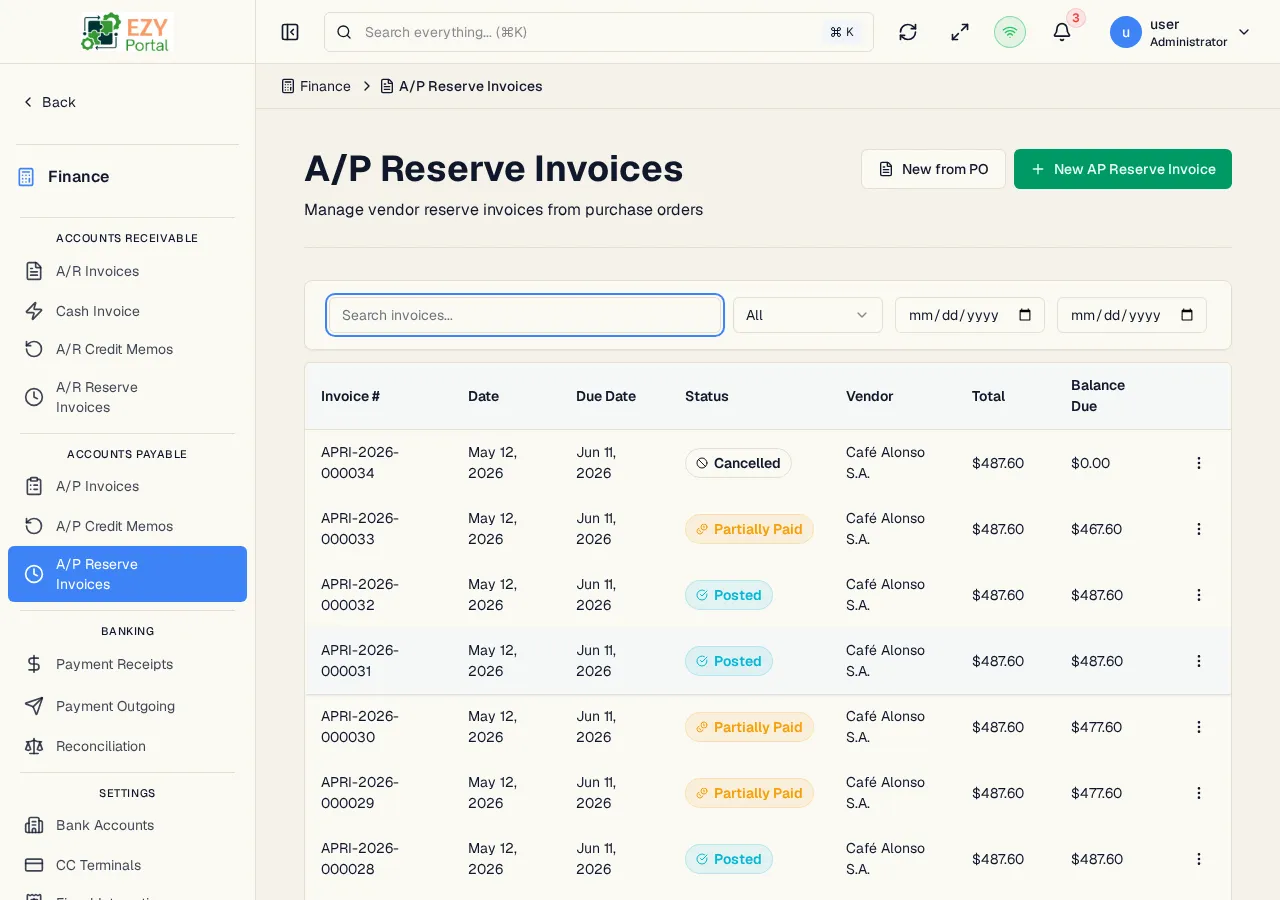
Navigate to Finance → Accounts Payable → A/P Reserve Invoices in the sidebar, or go to /finance/ap/reserve-invoices.
| Column | Default Visible | Sortable | Description |
|---|
| Doc # | Yes | Yes | System-assigned document number |
| Date | Yes | Yes | Document date |
| Due Date | Yes | Yes | Payment due date |
| Status | Yes | Yes | Status badge |
| Vendor | Yes | Yes | Business partner name |
| Total | Yes | Yes | Grand total amount |
| Balance Due | Yes | Yes | Remaining unpaid balance |
| Status | Description |
|---|
| Draft | Reserve is being prepared; not yet posted |
| Posted | Reserve is posted; provisional vendor exposure is recognized |
| Partially Paid | One or more vendor payments have been applied but the balance is not zero |
| Paid | Balance is fully settled |
| Partially Credited | A credit memo has offset part of the reserve |
| Credited | Reserve has been fully offset by credit memos |
| Closed | Fully settled |
| Cancelled | Reserve has been cancelled |
| Filter | Type | Description |
|---|
| Search | Free text | Searches by document number or vendor name |
| Status | Select | Filter by status |
| Date From / To | Date | Document-date range |
Default sort: Created date descending. Load More pattern with 20 records per load.
| Action | Description | Permission |
|---|
| New from Goods Receipt | Pick a confirmed Goods Receipt; the reserve pre-fills from its lines, with line-level source tracking | canCreateAPReserveInvoice |
| New Reserve Invoice | Standalone create — no source document | canCreateAPReserveInvoice |
| Action | Description | Permission |
|---|
| View | Open the detail page | Any |
| Edit | Edit a Draft reserve | canEditAPReserveInvoice |
| Post | Transition Draft → Posted | canPostAPReserveInvoice |
| Cancel | Cancel the reserve (reason required when cancelling from Posted) | canPostAPReserveInvoice |
| Pay | Open the Vendor Payment form with this reserve pre-selected for application | canCreateVendorPayment |
| Duplicate | Create a new Draft copy | canCreateAPReserveInvoice |
| Delete | Permanently delete — Draft only | canDeleteAPReserveInvoice |
- Header — Document Number, Date, Reference, Remarks, Due Date.
- Parties — Vendor, Contact, Billing Address, Shipping Address.
- Commercial — Currency, Payment Terms, Price List.
- Lines — Item, Description, Quantity, Unit Price, Discount, Tax Category, Tax Amount, Line Total. Each line tracks against the Goods Receipt source line.
- Totals — Subtotal, Discount %, Tax, Grand Total, Balance Due.
- Source Document — When created from a Goods Receipt, the source receipt’s type, number, and link are displayed.
- Settlements — Applied vendor payments and A/P Credit Memos are listed.
- A/P Reserve Invoices created from a Goods Receipt show a source-document badge on the detail page linking back to the receipt.
- The reserve is a provisional liability — it is intended to be replaced or supplemented by the final A/P Invoice once the vendor’s formal invoice is received.
- A vendor payment application can target an A/P Reserve Invoice directly (target type
AP_RESERVE_INVOICE).
- In single-currency tenants the currency field is hidden.
- Open the page from the sidebar under Finance → Accounts Payable.
- Click New from Goods Receipt to create a reserve against a confirmed receipt before the vendor invoice arrives.
- Post to record the provisional liability.
- When the vendor’s final invoice is received, record an A/P Invoice and clear the reserve.